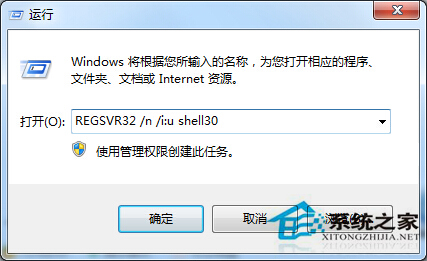
動態連結庫(DLL)是 Windows 實現共享函式庫的機制,可讓多個程式共用同一段程式碼。當系統提示缺少或損壞特定 DLL 檔(如 SHELL32.dll)時,可透過內建工具快速修復。
SHELL32.dll
C:\Windows\System32\SHELL32.dll
REGSVR32 /n /i:u shell32
此法簡單快捷,適用於大多數 DLL 遺失或損壞的情況。
Win7 磁碟碎片整理完整教學:排程自動、手動分析、SSD 免整理
Win7 檔案總管頻繁停止運作自動重啟?修改登錄檔徹底解決
Win7 顯示已知副檔名:資料夾選項取消隱藏副檔名設定
Win7 筆電無線訊號滿格卻無法連線:路由器重啟、IP 衝突、繳費、重設、換機五大排查
Win7 如何關閉操作中心提示?群組原則與控制台雙重關閉法
Windows 7 刪除所有系統還原點步驟教學:釋放磁碟空間
Win7 視窗邊框變難看像 XP/2000?啟用 Aero Peek 與透明玻璃效果恢復預設美觀
電腦音箱無聲音只有電流聲?排查驅動、線材、硬體四步驟