C 槽 Windows\WinSxS 動輒佔用 10GB+,實為 Windows 元件存放區(Component Store),支援系統更新、回滾、並存多版本組件。**嚴禁直接刪除**,會導致系統損壞。正確做法是使用官方工具 Dism++ 安全清理暫存、取代版本。
WinSxS 核心認知
- 功能:儲存所有系統元件版本,支援無縫更新/復原
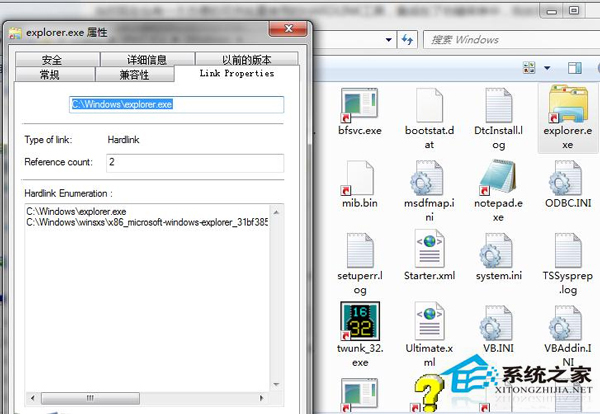
- 硬連結機制:實際佔用空間遠小於檔案總大小顯示值
- 刪除後果:系統無法更新、修復、啟動(僅能進安全模式)
安全清理方法:Dism++(推薦)
- 下載 Dism++(GitHub/官網),選對 32/64 位版本
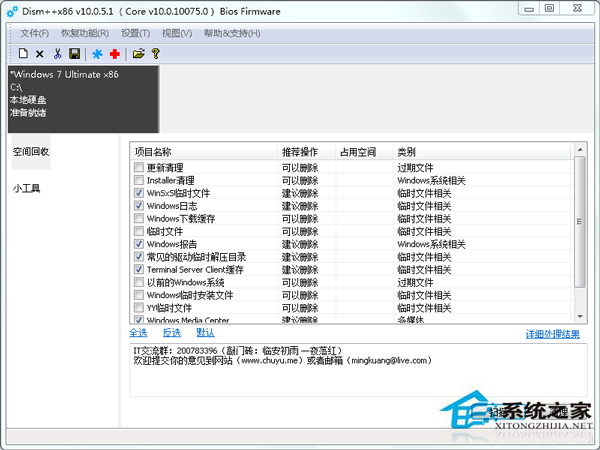
- 以系統管理員身分執行 → 「空間回收」 → 掃描
- 核心勾選項:「WinSxS 備份檔案」、「取代的元件」、「臨時檔案」
- 確認掃描結果 → 「清理」 → 等待完成
- 通常可釋放 1-3 GB 空間,不影響系統穩定
替代方案(不裝第三方工具)
- 磁碟清理 → 「清理系統檔案」 → 勾選「Windows 更新清理」、「裝置驅動程式套件」
- 命令列:
dism /online /cleanup-image /startcomponentcleanup
- 命令列(深度):
dism /online /cleanup-image /spsuperseded(移除 Service Pack 備份)
黃金法則:絕不手動刪除 WinSxS 內容。定期執行 Dism++ 或系統內建清理,維持元件存放區健康精簡。