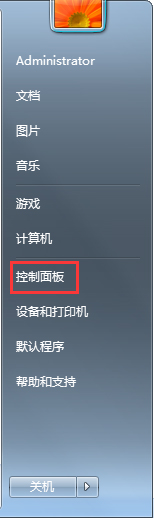
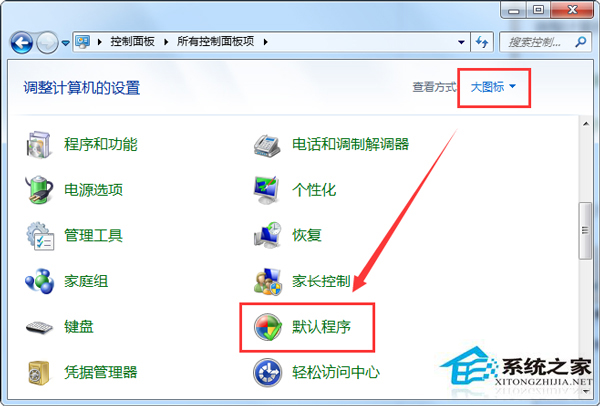
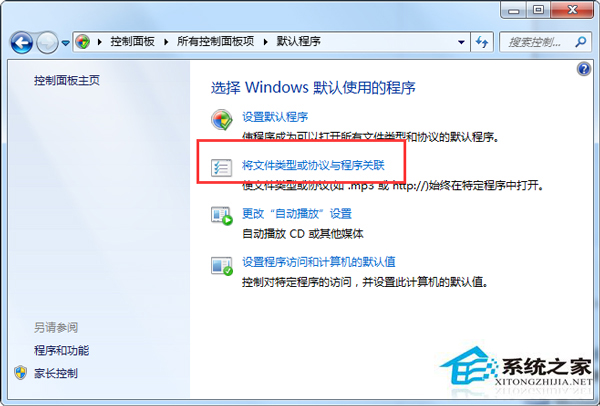
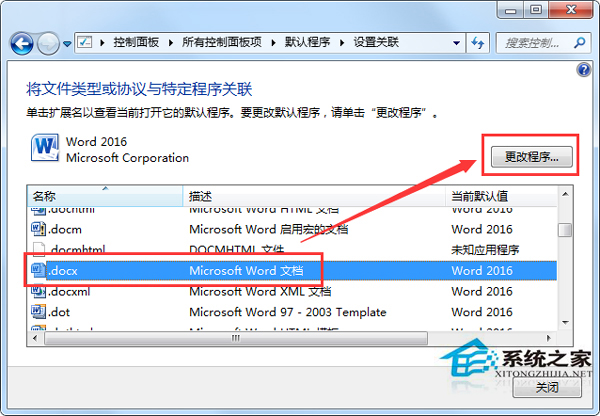
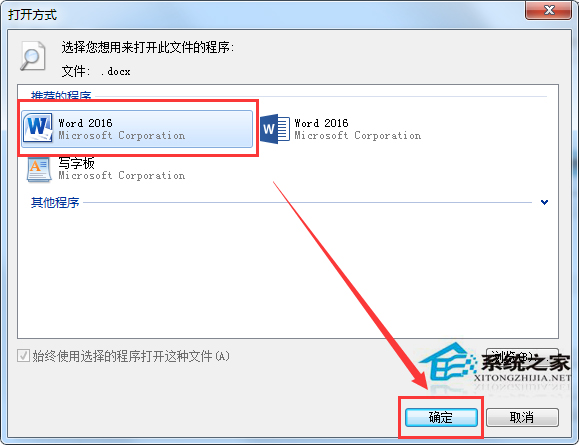
Win7 寫字板開啟 Word 文件(.doc/.docx)出現亂碼,主因是檔案關聯錯誤導致以純文字模式讀取。將副檔名關聯回 Microsoft Office Word 即可正常顯示格式與內容。
說明:寫字板(WordPad)為輕量級文字處理器,不支援完整 Word 排版功能。若未安裝 Office,建議改用 LibreOffice Writer、WPS Office 或線上編輯器開啟 .docx 檔案。
Win7 Daemon Tools Lite 虛擬光碟機安裝與使用完整圖文教學
Win7 任務管理器怎麼開?三大快速鍵 + 右鍵選單全掌握
Win7 電腦死機/藍屏/卡頓根因分析:軟體、系統、病毒、硬體四大維度排查法
Win7 缺少 Msvcr100.dll 無法啟動遊戲/軟體?官方安裝 Visual C++ 2010 Redistributable 徹底解決
Win7 版 Excel 試算表格線消失?一鍵找回網格線
Win7 移除系統管理員密碼,免輸入密碼直接進入桌面
Win7 開機 CPU 風扇轉一下就停機?六大硬體排查步驟 (電源/顯示卡/記憶體/主機板)
Win7 旗艦版藍畫面 0x0000002E 解決:記憶體奇偶校驗錯誤、記憶體診斷、停用快取、安全模式 VGA、驅動/BIOS 更新、最後正確配置