Windows XP Windows 7 Windows 2003 Windows Vista Windows 綜合教學 Linux 系統教學
Windows 10 Windows 8 Windows 2008 Windows NT Windows Server 電腦軟體教學

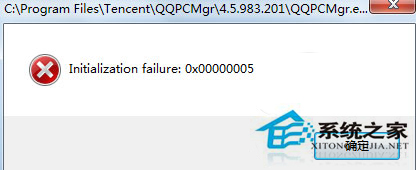
Win7 開啟 QQ 報錯 Initialization failure: 0x00000005 修復:註冊 msxml3.dll 或手動替換

編輯:Win7 系統應用技巧

Win7 執行 QQ 彈出 Initialization failure: 0x00000005,主因是 msxml3.dll (Microsoft XML Core Services 3.0) 註冊遺失或檔案損毀。提供命令列註冊與手動替換雙重修復方案。

方案一:命令列重新註冊 (首選)

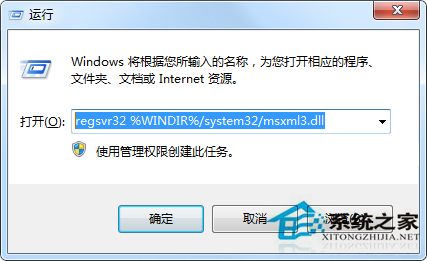
  1. Win+R → 輸入 regsvr32 %WINDIR%\system32\msxml3.dll → 確定
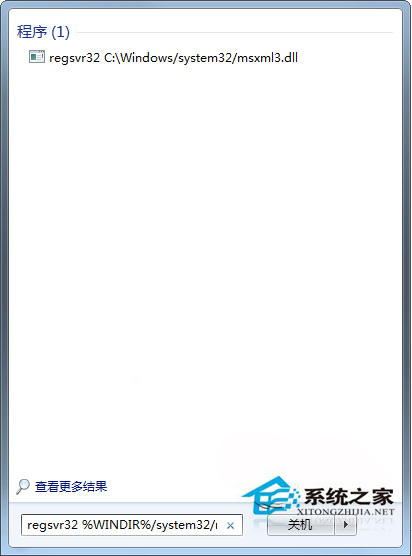
  2. 或「開始」搜尋框直接貼上上述指令按 Enter
  3. 彈出「DllRegisterServer 在 ... 成功」對話框 → 重新啟動 QQ

QQ錯誤0x00000005
執行regsvr32
搜尋框執行

方案二:手動下載替換 msxml3.dll (註冊失敗時)

  1. 根據系統版本 (32/64 位) 下載對應 msxml3.dll (微軟官網或可信 DLL 庫)
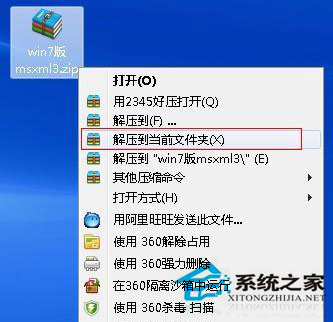
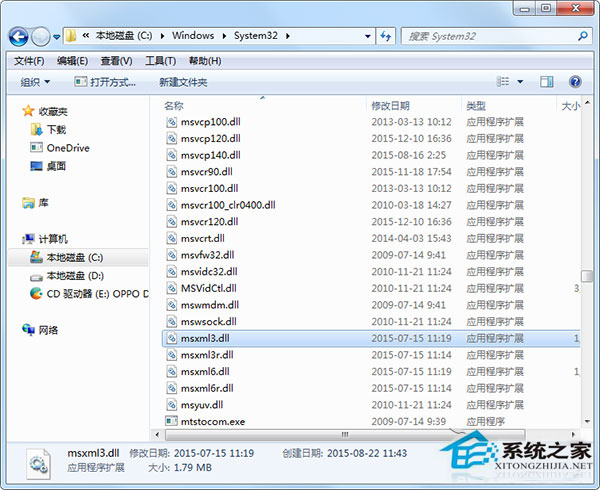
  2. 解壓 → 將 msxml3.dll 複製至 C:\Windows\System32\ (64 位系統同時複製至 SysWOW64\)
  3. 再次執行方案一註冊指令
  4. 啟動 QQ 驗證

解壓msxml3.dll
複製至System32

補充說明

  • msxml3.dll 為 XML 解析核心元件,QQ、IE、Office 等大量程式相依
  • 若註冊提示「模組載入失敗」→ 確認以管理員身分執行命令提示字元
  • 修復後建議執行 sfc /scannow 檢查其他系統檔案完整性

兩大方案可徹底修復 msxml3.dll 相關初始化失敗,恢復 QQ 及其他相依程式正常運行。

Copyright © Windows教程網 All Rights Reserved