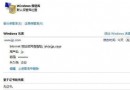
開啟網頁頻繁跳出「Internet Explorer - 無法驗證安全性,Name: ocget.dll」,是因登錄 CodeBaseSearchPath 指向微軟已停用的程式碼下載伺服器。清空該值即可停用提示。
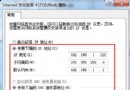
regedit 開啟登錄編輯器。HKEY_LOCAL_MACHINE\SOFTWARE\Microsoft\Windows\CurrentVersion\Internet Settings\CodeBaseSearchPathCODEBASE;https://codecs.microsoft.com/isapi/ocget.dllCODEBASE;原理:ocget.dll 為舊版 ActiveX 程式碼下載驗證元件,微軟已關閉對應伺服器,IE 嘗試連線失敗彈出警告。清空路徑即停用此驗證機制。
Win7 開始功能表消失?登錄修改 NoDriveTypeAutoRun 還原顯示
Win7 關閉網路磁碟機對應功能三種方法:GUI、右鍵選單、指令列
Win7 按 Ctrl+Shift 無法切換輸入法?ctfmon.exe 缺失完整修復教學
Win7 執行 gpedit.msc 顯示「剖析時發生錯誤」怎麼辦?重裝 IE 瀏覽器修復
Win7 如何調整螢幕對比度?顯示卡控制台與系統校正工具兩法教學
Win7 如何禁止安裝軟體?停用 Windows Installer 服務防止軟體安裝教程
Win7 開啟 iTunes 提示「Bonjour 服務已停用」?服務管理啟用 Bonjour Service 設為自動延遲