Windows XP Windows 7 Windows 2003 Windows Vista Windows 綜合教學 Linux 系統教學
Windows 10 Windows 8 Windows 2008 Windows NT Windows Server 電腦軟體教學

Win7 如何禁用磁碟寫入保護?註冊表修改解決 USB 無法複製檔案

編輯:Win7 系統應用技巧

插入 USB 隨身碟、行動硬碟提示「磁碟受寫入保護」無法複製檔案?透過註冊表建立 WriteProtect 值設為 0,即可徹底關閉系統層級寫入保護功能。

操作步驟

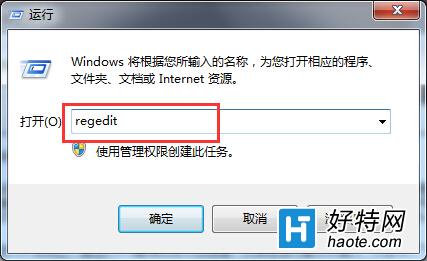
  1. Win+R 輸入 regedit 開啟註冊表編輯器。
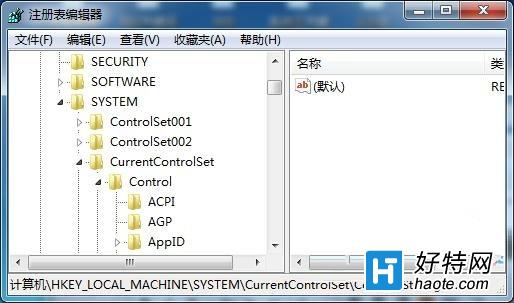
  2. 展開路徑:HKEY_LOCAL_MACHINE\SYSTEM\CurrentControlSet\Control\StorageDevicePolicies(若無此鍵值,右鍵 Control → 新增 → 金鑰,命名為 StorageDevicePolicies)。
  3. 右鍵右側空白處 → 新增 → DWORD (32 位元) 值,命名 WriteProtect。
  4. 雙擊 WriteProtect,數值資料設為 0 → 確定。
  5. 重新開機或重新插拔 USB 裝置生效。

執行regedit

建立WriteProtect值

設定完成後,USB 裝置將不再受寫入保護限制,可正常讀寫。

Copyright © Windows教程網 All Rights Reserved