Windows XP Windows 7 Windows 2003 Windows Vista Windows 綜合教學 Linux 系統教學
Windows 10 Windows 8 Windows 2008 Windows NT Windows Server 電腦軟體教學

Win7 查詢本機 IP 位址指令教學 (ipconfig/all)

編輯:Win7 系統應用技巧

IP 位址是區域網路通訊的身分證,設定共享、遠端桌面、連接埠轉發、伺服器架設皆需用到。Win7 透過 ipconfig /all 指令可查詢完整網路介面卡資訊。

查詢步驟

  1. Win+R → cmd → Enter 開啟命令提示字元。
  2. 輸入:ipconfig /all → Enter。
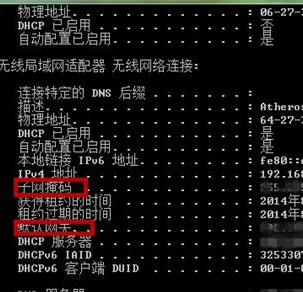
  3. 畫面顯示所有網路介面卡詳細資訊:
    IPv4 位址 (內網 IP)、子網路遮罩、預設閘道、DNS 伺服器、實體位址 (MAC)、DHCP 啟用/租約 等。

ipconfig/all 執行結果

常見介面卡識別

  • 乙太網路介面卡 / 區域連線:有線網卡。
  • 無線網路連線 / Wireless Network Connection:無線網卡。
  • 虛擬介面卡 (VirtualBox/VMware/Hyper-V) : 虛擬機網路。
  • 藍牙網路連線:藍牙 PAN。

補充指令

  • ipconfig:僅顯示 IP、子網路遮罩、閘道 (精簡版)。
  • ipconfig /release && ipconfig /renew:重新向 DHCP 申請 IP。
  • ipconfig /flushdns:清除 DNS 快取。
  • getmac:快速查詢所有介面卡 MAC 位址。

一行指令掌握完整網路身分資訊,網路設定與排查必備基本功。

Copyright © Windows教程網 All Rights Reserved