Windows XP Windows 7 Windows 2003 Windows Vista Windows 綜合教學 Linux 系統教學
Windows 10 Windows 8 Windows 2008 Windows NT Windows Server 電腦軟體教學

Windows 7 查看系統版本與詳細資訊的三種方法

編輯:Win7 系統應用技巧

快速確認 Windows 7 版本(家用版、專業版、旗艦版等)、位元數(32/64-bit)與建置編號,對軟體相容性疑難排解至關重要。本文提供三種查看方式,滿足不同需求。
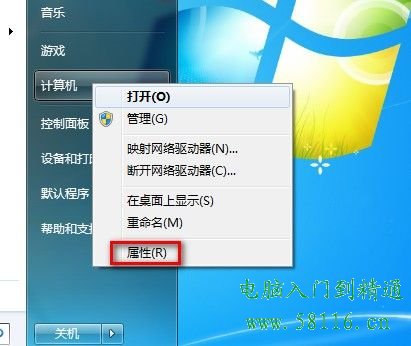
方法一:系統內容視窗(最快)

  1. 開始功能表右鍵點擊「電腦」→ 選擇「內容」。
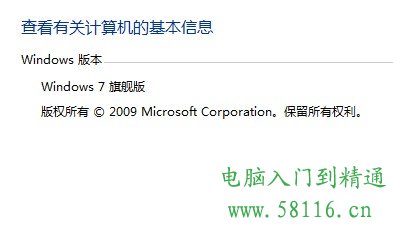
  2. 「Windows 版本」區域即顯示版本名稱、版權資訊、系統類型(32/64 位元)。

電腦內容視窗 Windows 版本資訊

方法二:系統資訊工具(詳細)

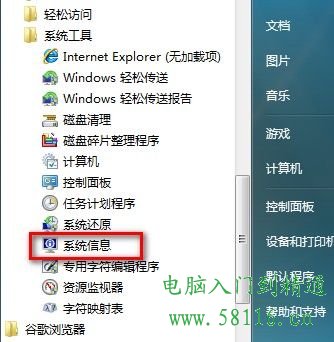
  1. 「開始」→「所有程式」→「配件」→「系統工具」→「系統資訊」。
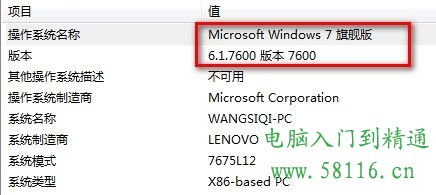
  2. 「系統摘要」頁籤顯示完整作業系統名稱、版本、建置編號、系統類型、安裝日期等詳細資訊。

系統資訊工具入口 系統摘要詳細資訊

方法三:指令提示字元(指令控制)

  1. 「開始」→ 輸入 `cmd` → Enter 開啟命令提示字元。
  2. 輸入 `ver` 顯示版本號;輸入 `systeminfo` 顯示完整系統資訊(含熱修補套件、網路卡等)。

版本對照快速參考

版本名稱適用對象
Windows 7 Starter入門級筆電,功能受限
Windows 7 Home Basic新興市場零售版
Windows 7 Home Premium家庭多媒體用戶
Windows 7 Professional中小企業/進階用戶
Windows 7 Enterprise大型企業大量授權
Windows 7 Ultimate功能最完整零售版
Copyright © Windows教程網 All Rights Reserved