系統怪怪的、功能失效?可能是系統檔案損毀。Win7 內建系統檔案檢查器 (SFC) 掃描並自動修復受損系統檔,無需重灌。
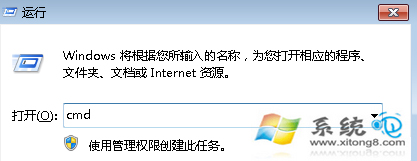
cmd
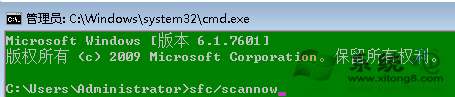
sfc /scannow
建議定期執行 (如月一次),維持系統健康。若 SFC 無法修復,可嘗試 DISM /Online /Cleanup-Image /RestoreHealth (Win7 需安裝 DISM 工具)。
DISM /Online /Cleanup-Image /RestoreHealth
Windows 7 下 VMware Workstation 虛擬機器無線/NAT 上網完整設定
Windows 7/8 固定網頁字型大小:IE 網際網路選項 → 輔助功能 → 忽略網頁指定字號
Windows 7 雙螢幕擴充顯示:筆電外接螢幕同時玩遊戲看電影教學
解決 Windows 7 音量忽大忽小:關閉「通訊」分頁自動調節音量功能
Windows 7 滑鼠懸停自動啟動視窗,快速切換作業視窗
Windows 7 系統優化基礎設定:視覺效果、錯誤回報、系統還原、自動更新、遠端協助、Dr.Watson 完整關閉指南
Win7 黑畫面「您可能是盜版受害者」?Windows Loader 修復+關閉自動更新防復發
聯想筆電 Windows 7 BIOS 啟用內建網卡完整教學