Windows XP Windows 7 Windows 2003 Windows Vista Windows 綜合教學 Linux 系統教學
Windows 10 Windows 8 Windows 2008 Windows NT Windows Server 電腦軟體教學

Win7 桌面圖示全變 Word 圖示?刪除 IconCache.db 重建圖示快取教學

編輯:Windows 7 系統介紹

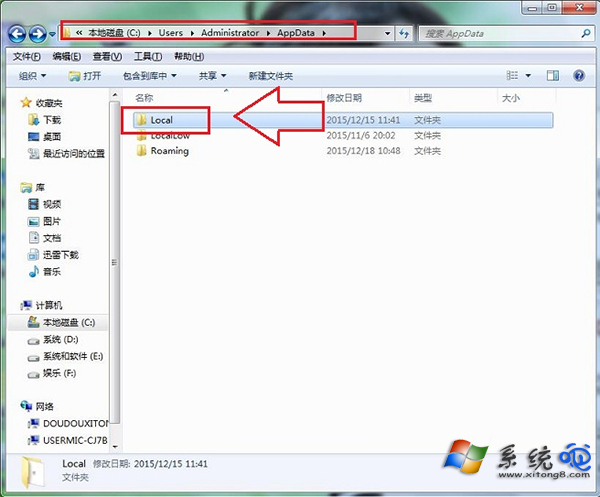
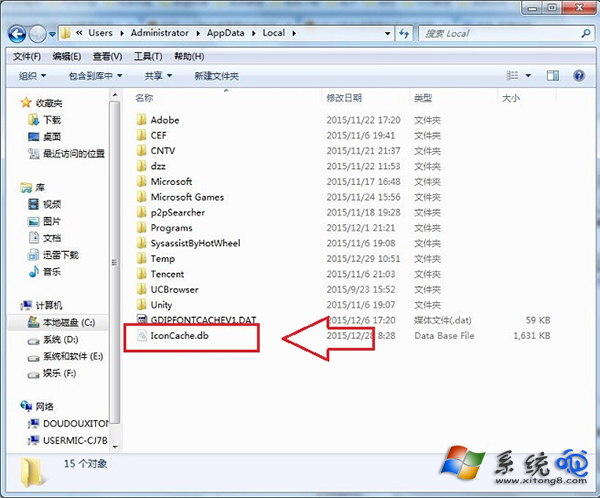
桌面所有捷徑圖示突然變成 Word 文件圖示,主因是圖示快取檔 IconCache.db 損毀。修復:開啟 C:\Users\使用者名稱\AppData\Local → 找到 IconCache.db(隱藏檔需先設定顯示隱藏檔案) → 刪除 → 重開機,系統自動重建快取,圖示即恢復正常。
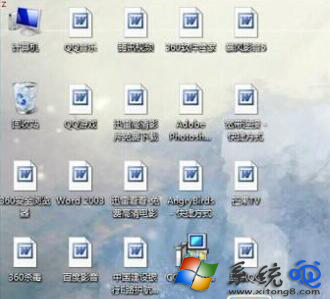
修復步驟

  1. 開啟「電腦」→ 依路徑進入 C:\Users\Administrator\AppData\Local(依實際使用者帳號調整)。
  2. 若未見 IconCache.db,請先「資料夾選項」→「檢視」→ 勾選「顯示隱藏的檔案、資料夾及磁碟機」。
  3. 刪除 IconCache.db。
  4. 重新開機,桌面圖示自動恢復正常。

此法適用於所有圖示顯示異常(變白、變預設圖示、變特定程式圖示)情況。
Copyright © Windows教程網 All Rights Reserved