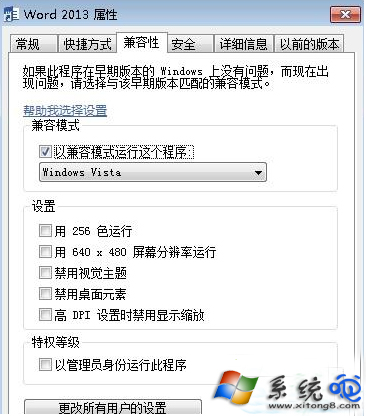
Office 2013 在 Win7 閃退,主因是捷徑屬性誤勾選「相容模式」並設為「Windows Vista」。解法:右鍵 Office 捷徑 →「內容」→「相容性」索引標籤 → 取消勾選「以相容模式執行這個程式」→ 確定套用,重新啟動 Office 即可正常運作。
此問題常見於從舊系統遷移捷徑或手動建立捷徑時誤設相容模式。
Windows 7 檔案關聯與開啟方式設定(控制台預設程式)
Win7 建立 VMware Workstation 虛擬機器完整圖文教學:從新建到掛載 ISO 啟動
Win7 系統保留分區(100MB/200MB)能否刪除?深度解析
Win7 Visual Studio 提示「系統找不到指定檔案」?替換 cvtres.exe 檔案修復
Windows 7 任務列時鐘顯示星期幾完整設定教學
Win7 禁止系統還原功能(群組原則法)
索尼 VAIO C 系列:繽紛機身色彩彰顯 Windows 7 個性魅力
Win7 開機自動重啟六大排查法:驅動、系統、灰塵、顯卡、記憶體、CPU