Windows XP Windows 7 Windows 2003 Windows Vista Windows 綜合教學 Linux 系統教學
Windows 10 Windows 8 Windows 2008 Windows NT Windows Server 電腦軟體教學

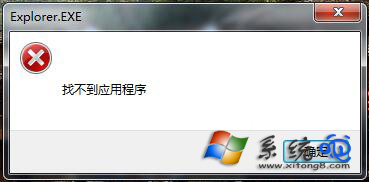
Win7 右鍵選單「找不到應用程式」解決:清除殘留註冊值

編輯:Windows 7 系統介紹

右鍵選單出現「找不到應用程式」,主因是解除安裝軟體時未清除右鍵選單殘留項目。提供兩種解法:① 強制刪除殘留檔案並重裝軟體;② 透過登錄編輯器刪除 HKEY_CURRENT_USER\Software\Microsoft\Internet Explorer\MenuExt 下的錯誤項目。
方法一:重裝覆蓋

檢查右鍵選單是否有已刪除軟體的殘留項目,若有,下載原安裝檔重新安裝覆蓋,再正確解除安裝。

方法二:登錄編輯器精準刪除

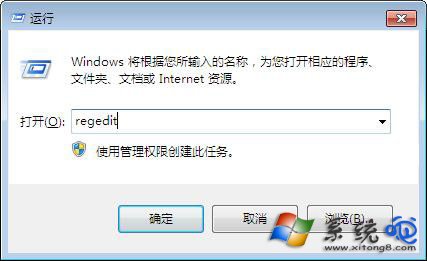
  1. Win+R → regedit。
  2. 展開 HKEY_CURRENT_USER\Software\Microsoft\Internet Explorer\MenuExt。
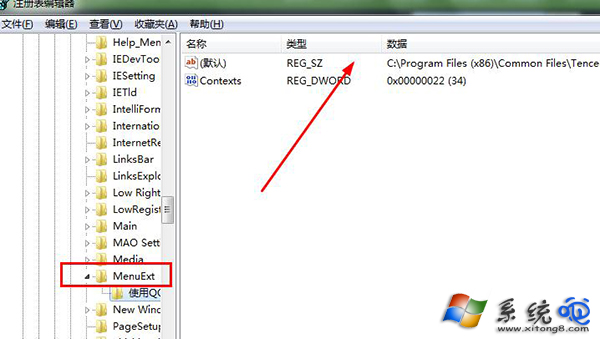
  3. 右側找到錯誤程式項目,右鍵刪除,按 F5 重新整理。

完成後右鍵選單即恢復乾淨。

Copyright © Windows教程網 All Rights Reserved