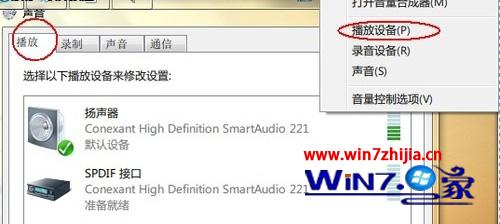
播放音訊時 audiodg.exe 佔用高 CPU?關閉喇叭增強功能即可解決。
audiodg.exe
此功能常導致 32 位系統音訊處理進程異常佔用資源,停用後 CPU 使用率立即下降。
Windows 7 關閉 IPv6 隧道介面指令教學:一鍵停用 Teredo/6to4/ISATAP
安裝 XP 與 Windows 7 雙系統完整圖文教學(舊版本先裝原則)
教您在 Win7 設定開機密碼,並提醒避免忘記密碼風險
Windows 7 設定靜態 IP 位址完整圖文教學
Windows 7 睡眠/休眠/混合睡眠完整 FAQ:區別、缺失選項、防喚醒、數據安全全解析
Win7 任務列預覽視窗延遲?修改登錄檔縮短 hover 時間
Win 7 畫圖工具不只是畫圖:縮放、標尺網格、放大鏡、全螢幕看圖四大隱藏功能
Windows 7 右下角小旗幟(操作中心)強大功能全解析