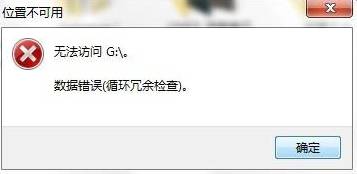
當 Windows 7 彈出「循環冗余檢查 (CRC) 錯誤」時,通常代表硬碟資料讀取出現問題。別慌張,內建的 chkdsk 指令往往能輕鬆搞定。
chkdsk
cmd /k chkdsk f: /f /x
f:
修復完成後,重新開機即可。若錯誤持續出現,可能是硬碟實體損壞,建議備份資料並送修。
Win7 存取網上鄰居提示「未授予使用者請求的登入類型」怎麼辦?群組原則授權網路存取權限
聯想/DELL/Acer Windows 7 旗艦版 OEM 序列號與啟用方法
Win7 筆電內建麥克風沒聲音?錄音裝置被停用,啟用「顯示停用裝置」恢復收音
Win7「顯示驅動程式停止回應並已恢復」徹底解決:關閉 Aero 玻璃/桌面合成
Win 7 市佔突破 5% 超越 Vista 前四個月總和
Win7 取代 XP 成為主流:銷售比 3:1,市佔率持續上升
Win7 螢幕色彩校正:內建 DCCW 工具調出最佳顯示效果
Win7網頁視頻緩存文件在哪?開啟隱藏文件→IE Internet選項→查看文件→按格式篩選mp4/flv/mkv快速定位