Windows XP Windows 7 Windows 2003 Windows Vista Windows 綜合教學 Linux 系統教學
Windows 10 Windows 8 Windows 2008 Windows NT Windows Server 電腦軟體教學

Win7 禁止系統內建燒錄功能:群組原則或註冊表關閉 CD 燒錄

編輯:Windows 7 系統介紹

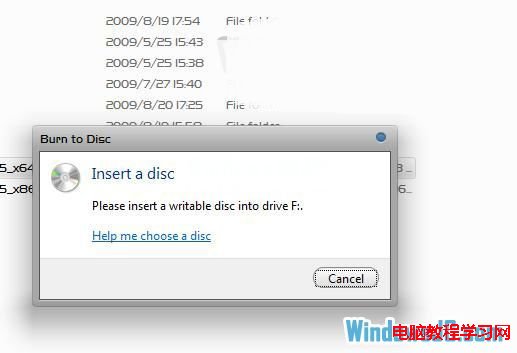
已安裝 Nero 等專業燒錄軟體,想關閉 Win7 內建燒錄功能避免衝突?提供群組原則版(專業版以上)與註冊表版(所有版本)兩種方法。

方法一:群組原則(專業版/企業版/旗艦版)

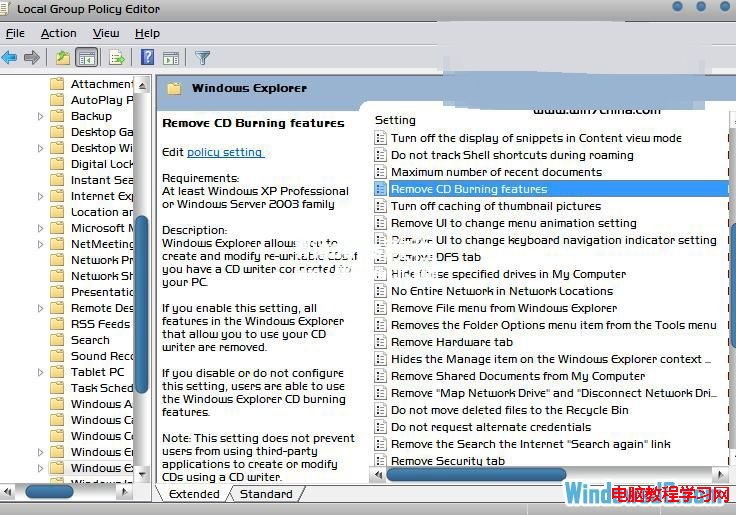
  1. Win+R → gpedit.msc。
  2. 依路徑:
    使用者設定 → 系統管理範本 → Windows 元件 → 檔案總管
  3. 找到「移除 CD 燒錄功能」→ 雙擊 → 「已啟用」→ 確定 → 重開機。

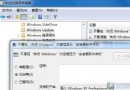
群組原則檔案總管
移除 CD 燒錄功能已啟用

方法二:註冊表(所有版本通用,含家用版)

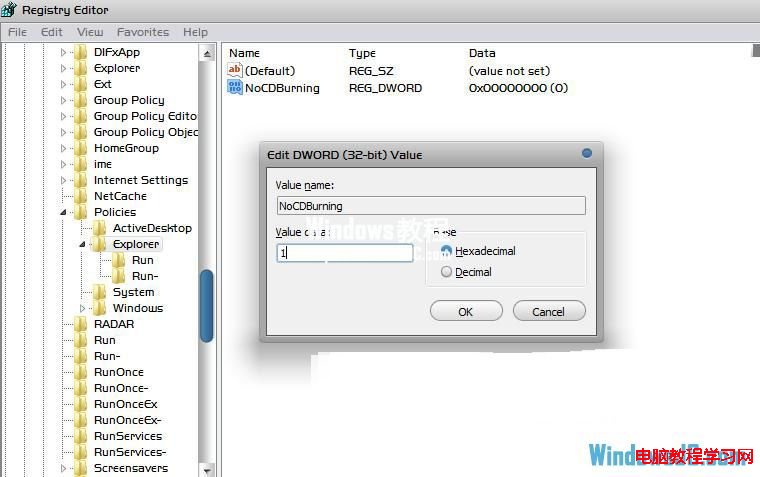
  1. Win+R → regedit。
  2. 定位:
    HKEY_CURRENT_USER\Software\Microsoft\Windows\CurrentVersion\Policies\Explorer
  3. 右鍵空白處 → 新增 → DWORD (32 位元)值 → 命名 NoCDBurning。
  4. 雙擊修改數值為 1 → 確定 → 重開機。

註冊表新增 NoCDBurning

恢復功能:群組原則設為「未設定」或註冊表刪除 NoCDBurning 值或改為 0,重開機即可。
Copyright © Windows教程網 All Rights Reserved