Windows XP Windows 7 Windows 2003 Windows Vista Windows 綜合教學 Linux 系統教學
Windows 10 Windows 8 Windows 2008 Windows NT Windows Server 電腦軟體教學

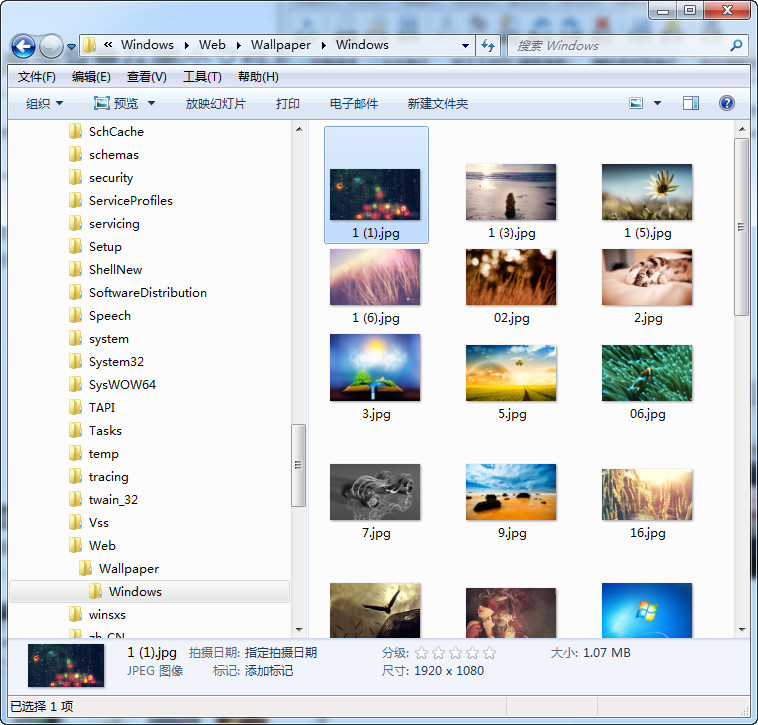
Win7 系統內建桌布儲存位置:C:\Windows\Web\Wallpaper 快速找到預設壁紙

編輯:Windows 7 系統介紹

想備份或使用 Win7 內建的精美桌布?預設儲存路徑為 C:\Windows\Web\Wallpaper,資料夾依主題分類 (Windows、Architecture、Characters、Landscapes、Nature 等),直接複製即可使用。

路徑說明

  • C:\Windows\Web\Wallpaper\Windows:預設 6 張經典桌布 (img0~img5.jpg)。
  • C:\Windows\Web\Wallpaper\Architecture、Landscapes、Nature 等:各主題高解析度桌布。
  • C:\Windows\Web\Screen:螢幕保護裝置背景圖片。

Wallpaper資料夾內容

應用方式

  1. 總管進入上述路徑 → 右鍵想要的圖片 →「設為桌面背景」。
  2. 或複製到個人圖片庫,再從「個人化」→「桌面背景」→「瀏覽」選取。

注意

系統資料夾需管理員權限才能寫入/刪除,建議複製到使用者資料夾後再操作。

Copyright © Windows教程網 All Rights Reserved