Windows XP Windows 7 Windows 2003 Windows Vista Windows 綜合教學 Linux 系統教學
Windows 10 Windows 8 Windows 2008 Windows NT Windows Server 電腦軟體教學

Win7 關閉 Windows 錯誤回報:用群組原則停用彈出視窗

編輯:Windows 7 系統介紹

程式當機時 Windows 7 會自動彈出「Windows 錯誤回報」詢問是否傳送錯誤資訊給微軟,對不想被打擾的使用者可透過群組原則啟用「停用 Windows 錯誤回報」,徹底關閉該彈出視窗。

操作步驟

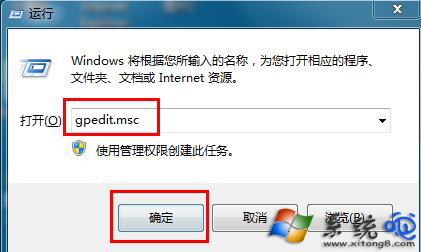
  1. 按 Win + R 輸入 gpedit.msc 開啟「本機群組原則編輯器」。
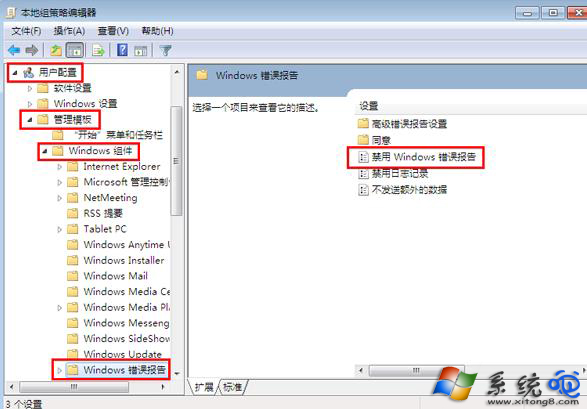
  2. 依序展開:
    「電腦設定」/「使用者設定」→「管理範本」→「Windows 元件」→「Windows 錯誤回報」。
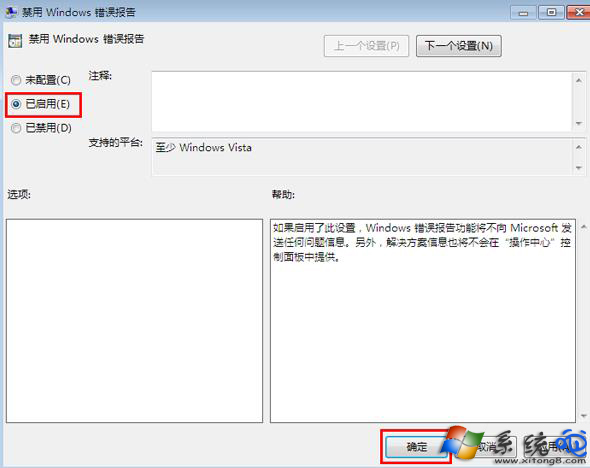
  3. 右側雙擊「停用 Windows 錯誤回報」,選擇「已啟用」→「確定」。

gpedit.msc 開啟群組原則

Windows 錯誤回報路徑

啟用停用錯誤回報

登錄替代方案(適用家用版)

若無 gpedit.msc,可執行 regedit 定位至:
HKEY_LOCAL_MACHINE\SOFTWARE\Microsoft\Windows\Windows Error Reporting
新建 DWORD Disabled 值為 1,重開機生效。

補充說明

關閉錯誤回報不影響系統穩定性,但會失去向微軟回報崩潰資訊協助改善產品的機會。建議僅在確認系統穩定、不需診斷崩潰原因時啟用此設定。

Copyright © Windows教程網 All Rights Reserved