覺得桌面捷徑左下角的小箭頭礙眼?修改登錄檔刪除 IsShortcut 字串值,即可隱藏所有捷徑箭頭,無需第三方工具。
regedit。HKEY_CLASSES_ROOT\lnkfile → 右側找到 IsShortcut → 右鍵刪除。HKEY_CLASSES_ROOT\piffile → 右側找到 IsShortcut → 右鍵刪除。explorer.exe 生效。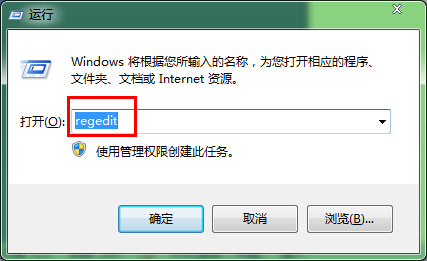
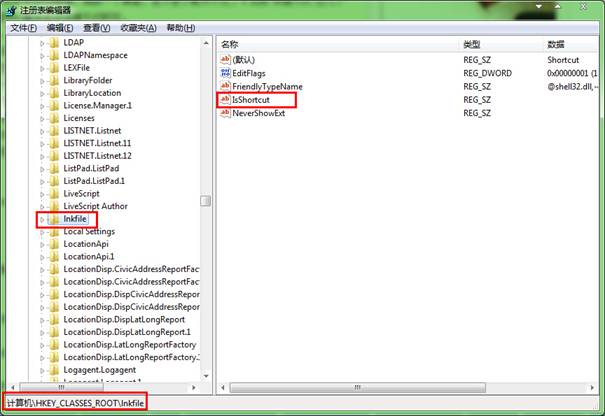
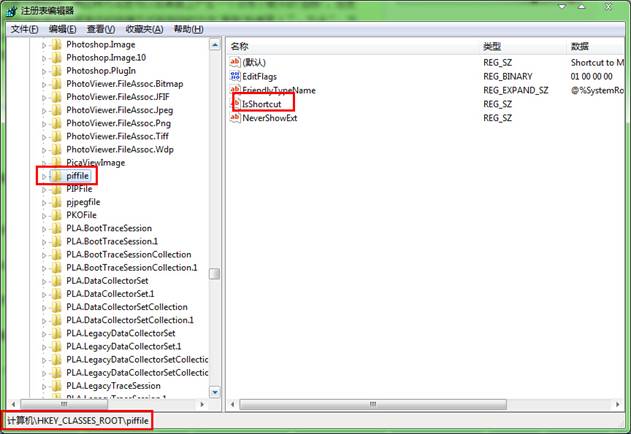

同路徑右鍵→「新增」→「字串值」→ 名稱 IsShortcut → 值留空 → 重開機即恢復箭頭。
Windows 待機、休眠、睡眠三模式差異詳解:Win7 新增睡眠模式結合雙優點,最推薦日常使用
Win7 關閉虛擬記憶體(分頁檔):系統進階設定→效能→虛擬記憶體設為「無分頁檔」
Win7 找不到區域連線?透過網路和共用中心「變更介面卡設定」找回本地連線
卸載 Windows 7 後清除殘留啟動選單項目:Bootsect.exe、XP 安裝碟修復、Vista msconfig 三大法
Win7 黑屏 (桌面消失僅剩滑鼠) 急救與預防:工作管理器新建任務下載修復工具、離線更新補丁/360 選擇性更新避免黑屏
Windows 7 內建桌面輪播功能:無需第三方工具,幾秒鐘設定自動更換壁紙