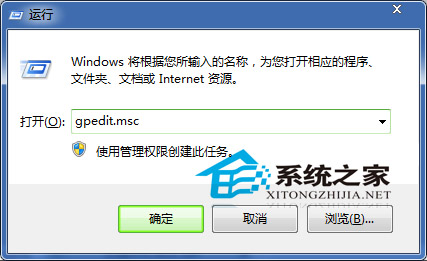
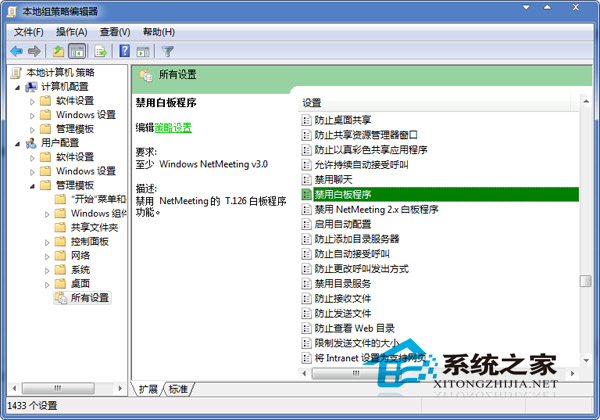
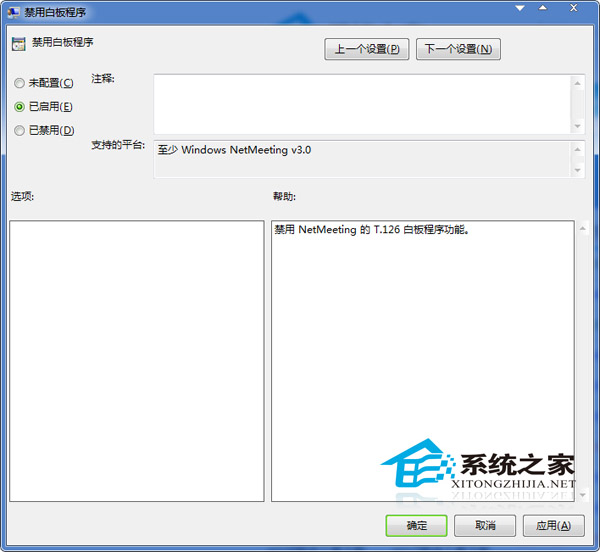
企業或學校環境可能需禁用 NetMeeting 白板功能以節省資源或符合政策。Windows 7 專業版以上可透過本機群組原則達成:
gpedit.msc
使用者設定 → 系統管理範本 → 所有設定
設定生效後,使用者將無法啟動白板程式。若需恢復,將該項目改為「未設定」或「已停用」即可。
Windows 7 之後:瀏覽器無法取代作業系統 雲端運算三屏一雲新紀元
Windows 7 隱藏系統保留分區 (100/200MB) 深度解析:功能、保護機制與操作風險
Windows 7 遠端桌面連線設定完整圖文教學
Win7/Win8 隱藏硬碟分區保護隱私資料:魔方電腦大師一鍵設定
Win7輕鬆實現PDF全文搜尋:安裝Foxit PDF IFilter插件完整教程
解決 Win7「輕鬆傳送」無法開啟檔案錯誤:三大修復方案
挖掘 Windows 7 隱藏主題包:用 %WINDIR%\Globalization\MCT 找出國家主題
手動修正 Win7 IPv6 介面識別碼隨機化缺陷:netsh 指令強制使用 EUI-64