高解析度螢幕雖然畫面細緻,但預設 100% 縮放下文字、圖示可能過小難以閱讀。Windows 7 提供內建的 DPI 縮放功能,讓您輕鬆放大介面元素。
操作步驟
- 在桌面空白處按右鍵,選擇「個人化」。
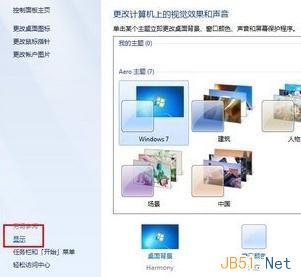
- 在左側點選「顯示」。
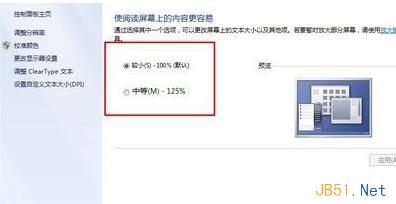
- 於「變更所有項目的大小」區域,選擇「中型 - 125%」或「大型 - 150%」,或點選「設定自訂文字大小 (DPI)」輸入自訂百分比。
- 按「套用」,系統會提示立即登出以生效,確認後重新登入即可看到放大後的介面。
提示:調整 DPI 會影響系統字體與控制項大小,不會改變螢幕實際解析度,畫面依然銳利。