Windows XP Windows 7 Windows 2003 Windows Vista Windows 綜合教學 Linux 系統教學
Windows 10 Windows 8 Windows 2008 Windows NT Windows Server 電腦軟體教學

Win7 任務欄跑側邊/頂部無法拖回底部?兩大法強制歸位並鎖定

編輯:Windows 7 系統介紹

任務欄莫名其妙跑到螢幕左側、右側或頂部,滑鼠拖不回去?提供兩套解法:圖形介面設定法與命令列強制重設法,總有一款能搞定。

方法一:屬性視窗歸位(最簡單)

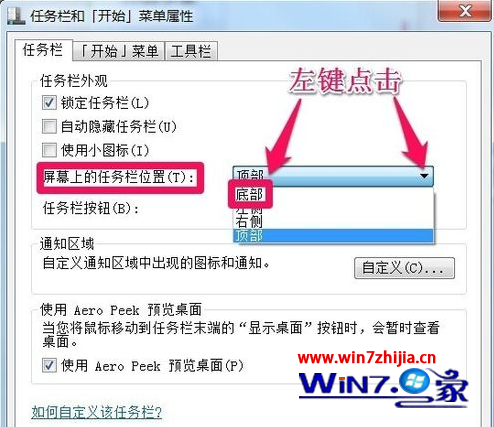
  1. 任務欄空白處右鍵→「屬性」。
  2. 「工作列在螢幕上的位置」下拉選「底部」→「套用」→「確定」。

方法二:命令列核爆重設(頑固情況適用)

  1. 任務欄右鍵取消勾選「鎖定工作列」。
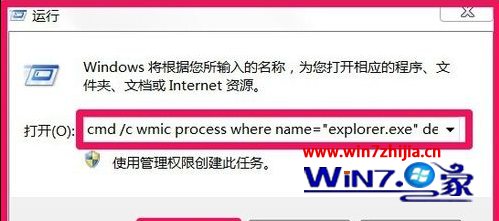
  2. Win+R 輸入以下命令並按 Enter:
cmd /c wmic process where name="explorer.exe" delete & explorer reg delete HKCU\Software\Microsoft\Windows\CurrentVersion\Explorer\StuckRects2 /f & taskkill /f /im explorer.exe & explorer
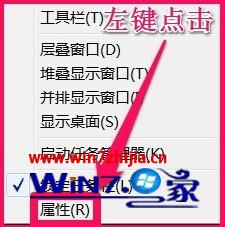
  1. 畫面閃爍後工作列自動重啟並回到底部,再右鍵勾選「鎖定工作列」固定。
工作列屬性 位置選底部 取消鎖定 命令執行 重新鎖定

原理解析:命令會終止 explorer、刪除記錄工作列位置的註冊表機碼 StuckRects2、重新啟動 explorer,使其回到預設底部位置。

Copyright © Windows教程網 All Rights Reserved