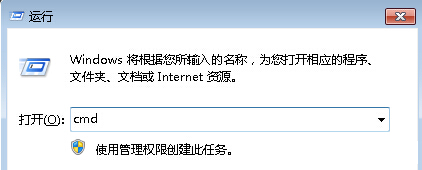
安裝 VPN 軟體修改網路堆疊導致無法上網。執行 netsh int ip reset 重置 TCP/IP、ipconfig /flushdns 清除 DNS 快取,並以管理員身分重新撥號即可恢復。
netsh int ip reset
ipconfig /flushdns
cmd
VPN 軟體常修改網路介面綁定順序,重置 TCP/IP 可恢復預設狀態。
Windows 7 語言包安裝完整步驟教學
Win7 印表機共享完整圖解:啟用 Guest 帳號與設定共享權限
網友熱議:Windows 7 五大顯著優點 價格親民、操作直觀、桌面動態、筆電優化、舊電腦也能跑
Win7 隱藏資料夾進階技巧:批次檔加密鎖定、偽裝成控制台、密碼保護
Win7 開啟 gpedit.msc 報錯?刪除 Geolocation 憑證 ADMX 檔修復組策略編輯器
Win7 列印字體模糊怎麼辦?DPI 調整與 ClearType 微調雙管齊下
Windows 7 十大待解難題:從安全性到升級體驗的全面檢視
Win7 徹底刪除頑固殘留檔案:自製 .bat 強制刪除腳本