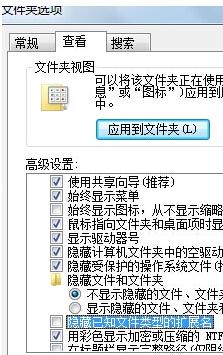
Windows 7 預設隱藏已知副檔名,導致無法直接改檔案格式。請先開啟副檔名顯示,再重新命名即可。
photo.png
.png
.jpg
重要提醒:僅改副檔名不會轉換檔案內容編碼,若需真正轉檔,請用畫圖、Photoscape、XnConvert 等工具「另存新檔」為 JPG 格式。
Win7 Chrome 被惡意綁定 hao123 首頁?修復捷徑與設定雙管齊下
Win7 網銀支付頁面無法開啟?修改登錄表修復 CSP 路徑
Windows 7 安裝 Ghost XP 後無開機選單,使用 NTBOOTautofix 修復雙開機
商用電腦應對「必須重新啟動」更新的三種策略:避免干擾前台業務
解決 Windows 7 專業學生版密鑰報錯 0xC004F061:註冊表修改 + slmgr 重置授權
Win7 工作列加入「地址」工具列:一鍵開啟網址、資源管理器、控制台、CMD 神技
Win7彈出USB提示「裝置正在使用中」?兩種安全移除方案徹底解決佔用
關閉 Windows 7 視窗拖曳邊緣自動最大化/分屏 (Aero Snap) 功能