Windows XP Windows 7 Windows 2003 Windows Vista Windows 綜合教學 Linux 系統教學
Windows 10 Windows 8 Windows 2008 Windows NT Windows Server 電腦軟體教學

Win7 工作管理器被鎖定無法開啟?群組原則解鎖教學

編輯:Windows 7 系統介紹

解決 Windows 7 工作管理器被停用/鎖定問題

若按 Ctrl+Shift+Esc 或 Ctrl+Alt+Del 無法開啟工作管理器,顯示「系統管理員已停用工作管理器」,通常是群組原則或登錄被修改。請用群組原則編輯器恢復。

操作步驟

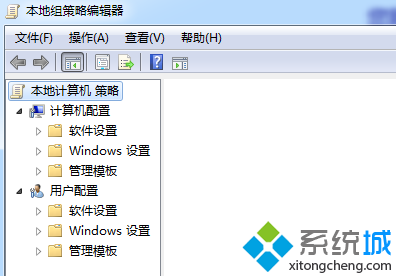
  1. 按 Win+R 輸入 gpedit.msc 開啟「本機群組原則編輯器」。
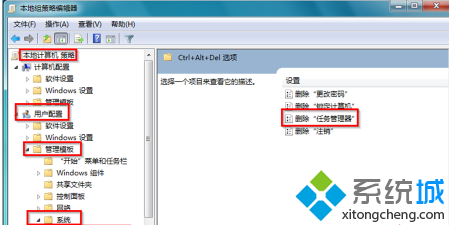
  2. 依序展開:
    本機電腦原則 → 使用者設定 → 系統管理範本 → 系統 → Ctrl+Alt+Del 選項
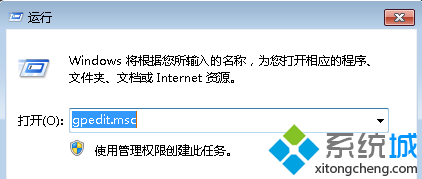
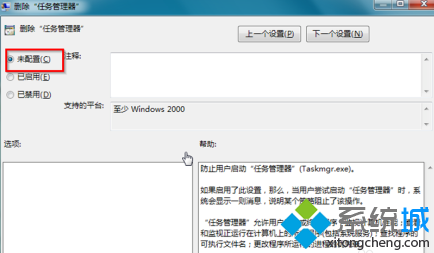
  3. 右側雙擊「移除工作管理器」,選擇「未設定」或「已停用」,點擊「確定」。
開啟群組原則編輯器 展開原則路徑 移除工作管理器設定 設為未設定或已停用

註:Windows 7 家用版無 gpedit.msc,請改用登錄編輯器:
HKEY_CURRENT_USER\Software\Microsoft\Windows\CurrentVersion\Policies\System,刪除或將 DisableTaskMgr 設為 0。

Copyright © Windows教程網 All Rights Reserved