Windows XP Windows 7 Windows 2003 Windows Vista Windows 綜合教學 Linux 系統教學
Windows 10 Windows 8 Windows 2008 Windows NT Windows Server 電腦軟體教學

Win7 關閉執行檔案「安全性警告」提示,註冊表一鍵設定

編輯:Windows 7 系統介紹

下載的 .exe、.bat、.vbs 等檔案執行時彈出「安全性警告」,可透過註冊表將這些副檔名加入低風險清單,取消提示。

設定指令

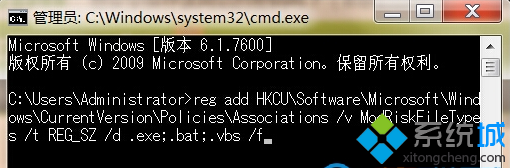
  1. Win + R → cmd 以管理員身分開啟。
  2. 執行:
reg add HKCU\Software\Microsoft\Windows\CurrentVersion\Policies\Associations /v ModRiskFileTypes /t REG_SZ /d ".exe;.bat;.vbs" /f
gpupdate /force
  1. 出現「使用者原則更新成功完成」即生效。

此設定僅影響目前使用者。若需全機生效,將 HKCU 改為 HKLM (需系統管理員權限)。
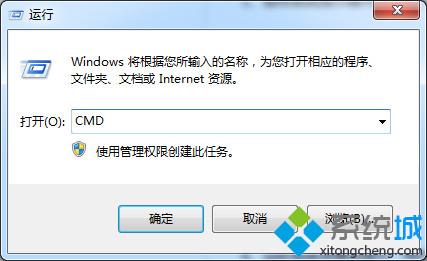
CMD 執行 reg add 指令 gpupdate 強制更新原則
Copyright © Windows教程網 All Rights Reserved