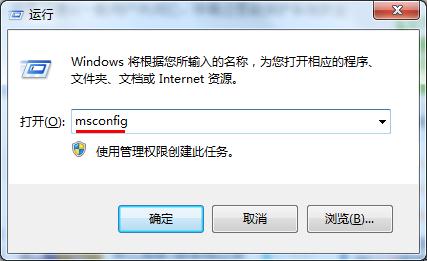
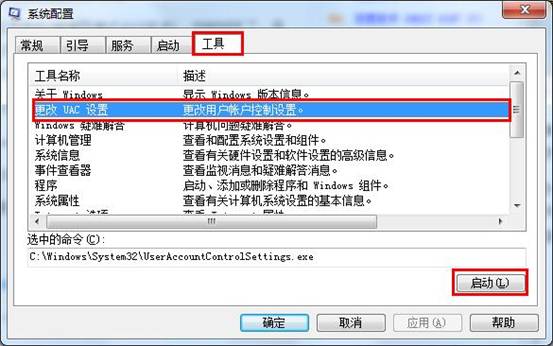
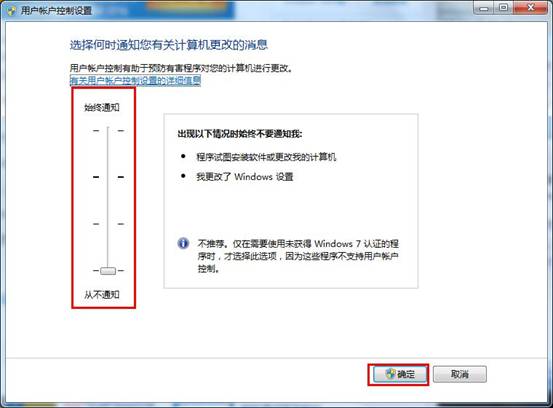
msconfig
關閉 UAC 降低系統安全性,建議僅在純淨測試環境使用,日常環境保持預設或中等級別。
Win7 開機彈出 supervisory.exe 錯誤?重裝 WinRAR 即可解決
Win7 純淨版實現多使用者遠端桌面並行連線:UniversalTermsrvPatch 破解
Win7 虛擬 WiFi 熱點全攻略:把筆電變無線路由器共享上網
Windows 7 新增熱鍵大全:視窗控制、工作列、檔案總管、投影、放大鏡一覽表
Win7 開機啟動項管理全攻略:啟動資料夾、msconfig、登錄表三大據點
Win7 字體改壞了?一鍵還原預設字體設定找回原廠手感
Win7 一鍵同步所有資料夾檢視設定:資料夾選項→檢視→套用至所有資料夾
Win7 網頁遊戲不卡卻能用記牌器:UAC 設定與相容模式雙管齊下