Windows XP Windows 7 Windows 2003 Windows Vista Windows 綜合教學 Linux 系統教學
Windows 10 Windows 8 Windows 2008 Windows NT Windows Server 電腦軟體教學

Win7 登錄表缺少 RPEnabled 鍵值?手動建立 .reg 檔匯入修復

編輯:Windows 7 系統介紹

部分優化操作會導致 HKEY_CURRENT_USER\Software\Microsoft\Windows\CurrentVersion\Explorer 下遺失 RPEnabled 值,影響某些介面功能。透過建立 .reg 檔匯入即可補回。

建立修復檔

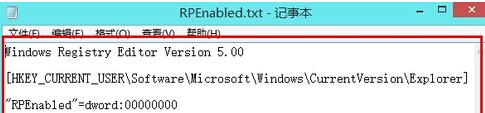
  1. 桌面右鍵 → 新增文字文件 → 貼入:
Windows Registry Editor Version 5.00

[HKEY_CURRENT_USER\Software\Microsoft\Windows\CurrentVersion\Explorer]
"RPEnabled"=dword:00000000
  1. 另存為 FixRPEnabled.reg(類型選所有檔案)。
建立 reg 檔
  1. 雙擊執行 → 是 → 重新開機。

匯入後該鍵值恢復預設值 0,相關功能恢復正常。

Copyright © Windows教程網 All Rights Reserved