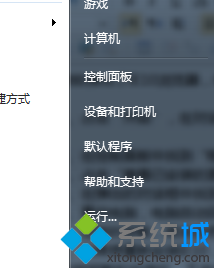
桌面/資源管理員右鍵選單直接加入「裝置管理員」,免去控制台多層點擊。
1. 新建記事本貼入以下內容:
Windows Registry Editor Version 5.00

[HKEY_CLASSES_ROOT\CLSID\{20D04FE0-3AEA-1069-A2D8-08002B30309D}\shell\Devices]
@=hex(2):...
"SuppressionPolicy"=dword:4000003c
"Icon"="DeviceProperties.exe"
[HKEY_CLASSES_ROOT\CLSID\{20D04FE0-3AEA-1069-A2D8-08002B30309D}\shell\Devices\command]
@=hex(2):...
[HKEY_CLASSES_ROOT\CLSID\{20D04FE0-3AEA-1069-A2D8-08002B30309D}\shell\AdvSysProp]
@=hex(2):...
"Icon"="cliconfg.exe"
[HKEY_CLASSES_ROOT\CLSID\{20D04FE0-3AEA-1069-A2D8-08002B30309D}\shell\AdvSysProp\command]
@=hex(2):63,00,6f,00,6e,00,74,00,72,00,6f,00,6c,00,20,00,73,00,79,00,73,00,64,00,2e,00,63,00,70,00,6c,00,00,00
2. 另存為 裝置管理員.reg。
3. 雙擊匯入登錄檔,右鍵「電腦」/桌面空白處即見「裝置管理員」選項。