需更換 Office 授權序號時,透過「程式和功能」的「變更」功能即可重新輸入金鑰。
1. 「開始」 → 「控制台」 → 「程式和功能」,找到 Office 2010/2013 項目點擊「變更」。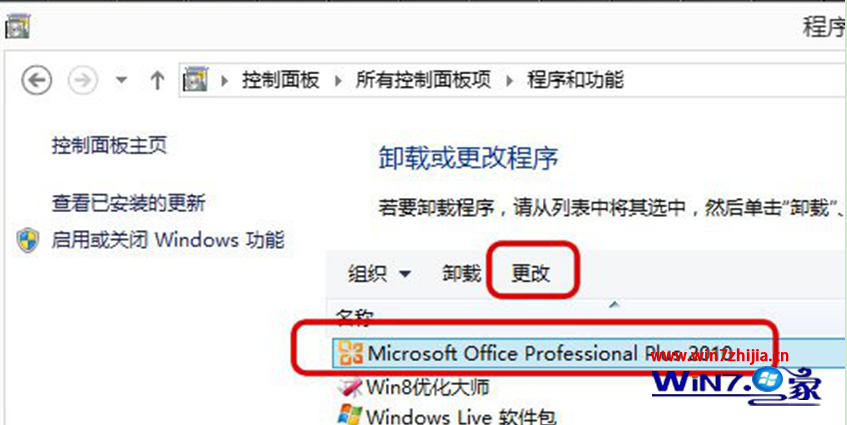
2. 彈出安裝精靈介面,選擇「輸入產品金鑰」。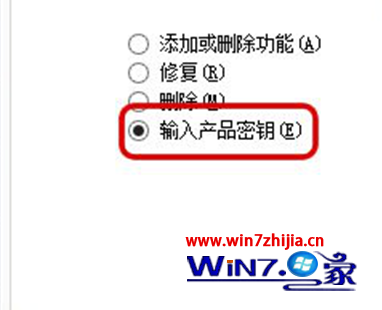
3. 輸入新的 25 字元產品金鑰,完成後 Office 即更新授權。
Win7 釋放磁碟空間 12 招:關閉還原/休眠、移動虛擬記憶體/文件庫、清理快取/日誌/暫存檔
Windows 7 SP1 安裝失敗終極解法:使用安裝光碟修復系統,還原 DriverStore 缺失檔案
Win7 下迅雷下載速度慢?破解 TCP/IP 連線數限制 + 關閉不需網路協定優化網卡負載
手工複製 Windows 隱藏管理員帳戶:注册表 SAM 鍵值克隆技術與後門風險
Win7 桌面背景投影片不切換怎麼辦?電源計劃啟用「投影片放映」
Win 7 重灌後必做 3 件事:自動更新、使用者帳戶控制、驅動程式優先序