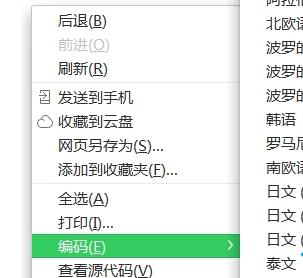
預設即為自動偵測。若仍亂碼: • 安裝擴充功能「CharSet」/「Encoding Detector」手動切換。 • F12 開發者工具 → Console 輸入 document.characterSet 看實際編碼。 • 聯繫網站管理員修正 Content-Type 標頭。
document.characterSet
Content-Type
保持瀏覽器編碼設定為「自動選擇/自動偵測」,避免手動鎖定特定編碼。
Win 7 刪除檔案提示「需要權限」:安全性標籤取得擁有權、安全模式刪除、註冊表右鍵取得權限三大方案
多監視器 vs 多重顯示:Windows 7 多螢幕架構差異與配置四大關鍵
使用 U 盤輕鬆安裝 Windows 7 完整圖文教學
鮑爾默警告:不可因 Windows 7 熱銷掉以輕心,蘋果搶佔高端市場需警惕
Win7 將資料夾檢視設定套用至所有資料夾
Win7 開啟 iTunes 提示「Bonjour 服務已停用」的解決方法
Win7 旗艦版修改睡眠時間圖文教學
Win 鍵的魅力:Windows 7 的「萬能鑰匙」十大神奇組合鍵