Windows PowerShell 是進階命令列殼層與腳本環境,Win7 內建但預設不在開始選單顯眼處。以下兩種快速開啟方式:
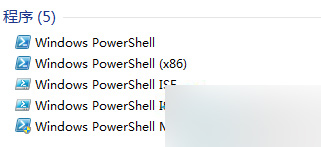
方法一:開始選單搜尋(最快)
- 點擊「開始」或按 Win 鍵。
- 在搜尋框輸入
PowerShell。
- 搜尋結果中右鍵點擊「Windows PowerShell」→ 選擇「以系統管理員身分執行」。
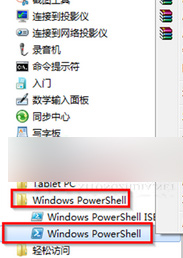
方法二:開始選單所有程式瀏覽
- 開始 → 所有程式 → 附屬應用程式 → Windows PowerShell。
- 右鍵點擊「Windows PowerShell」→ 「以系統管理員身分執行」。
建議習慣以系統管理員身分執行,以獲得完整系統管理權限。