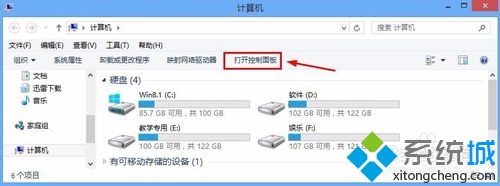
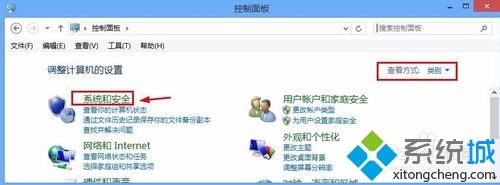
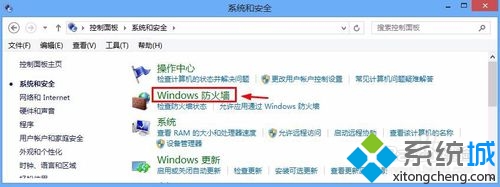
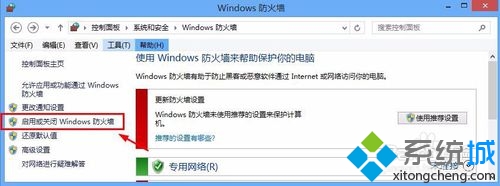
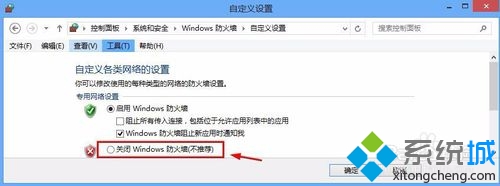
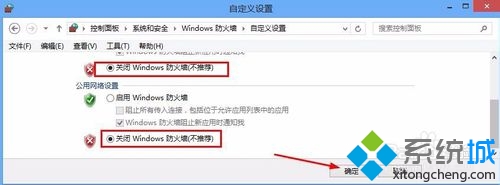
Win8 關閉防火牆步驟如下:
未來需重新開啟時同樣路徑操作即可。
Windows 7 一鍵還原預設字型:控制台字型設定按鈕即可恢復雅黑等系統字體
Win7 永久刪除檔案快捷鍵:Shift + Delete 使用教學
手動偵測與清除偽裝系統進程木馬(以WmiPrvSE.exe為例)
Win7網頁視頻緩存文件在哪?開啟隱藏文件→IE Internet選項→查看文件→按格式篩選mp4/flv/mkv快速定位
Win7 安裝 TTF 字型檔:雙擊預覽安裝與批次部署兩種方法
Win7 ADSL 自動斷線解決方案:關閉「閒置自動斷線」設定
Win7 語音辨識功能實測:語音控制電腦、語音輸入文字、訓練提升辨識率
Windows 7 磁碟管理首選 ADDS:取代 PQMagic 的全功能分區工具