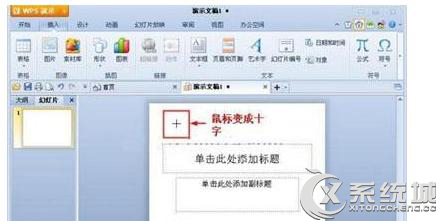
WPS 簡報插入自選圖形操作簡單,以下步驟教您快速上手。
即可在簡報中加入自訂圖形元素。
Win7 無法存取共用資料夾?Ping 測試、啟用共用服務、同一工作群組三步排查
Win7 安裝 Arduino 驅動完整步驟:裝置管理器手動指定驅動資料夾
Win7 系統無法開啟「零掛」輔助工具?兩種解決方案:降低 UAC 或啟用 Administrator 帳號
Win7 觀看網路影片常見問題 FAQ:版本限制、升級管道、Media Center 更新、教育網、殺毒軟體干擾
Win7 備份與還原完整詳解:系統還原、排程備份、系統映像、修復光碟、DISM 封裝工具
Win7 回收站清空後如何恢復刪除的檔案?完整資料救援教學
Win7 系統因 MMCSS 服務導致變慢?登錄表移除 Audiosrv 相依性解決
Win7 登入密碼過期怎麼辦?修改本機安全性原則延長密碼效期