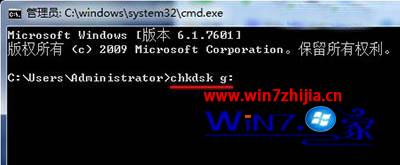
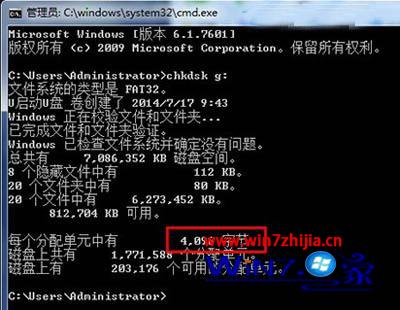
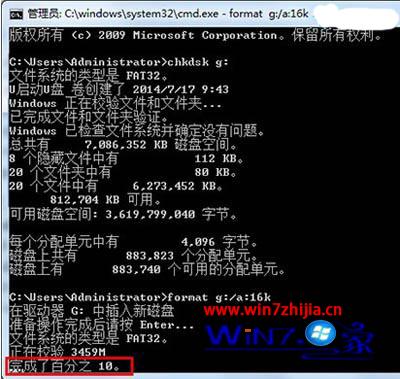
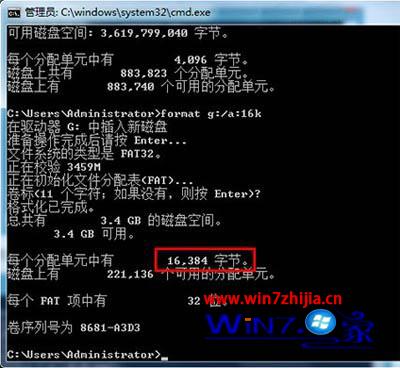
預設格式化配置單元 4096 位元組,改為 16384 (16KB) 可減少大量小檔案傳輸開銷。
cmd
chkdsk G:
format G: /a:16k
注意:此操作會清空 USB 隨身碟,請務必先備份。適用於大量小檔案傳輸場景,大檔案效果不明顯。
Windows 7 下 BattleLAN 無法運行?權限設定輕鬆解決
Win7 新裝系統藍屏?罪魁禍首可能是 atieclxx.exe 進程
Win7 安裝 Office 2013 錯誤 1402/1920/1406 完整解決方案彙整
Windows 7 旗艦版產品金鑰(僅供測試學習用途)
Windows 7 變慢?可能是「顏色校正」產生的 ICC 設定檔拖累效能
Win7 取消自動關機指令:shutdown -a 一鍵中止倒數
Win7 測試模式水印「內部版本 7601」去除教學:關閉測試簽章模式
Windows 7 開啟遠端桌面完整教學:含防火牆與群組原則設定