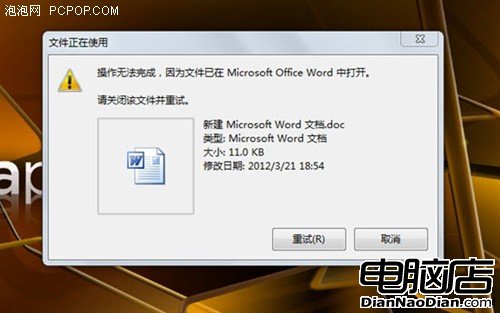
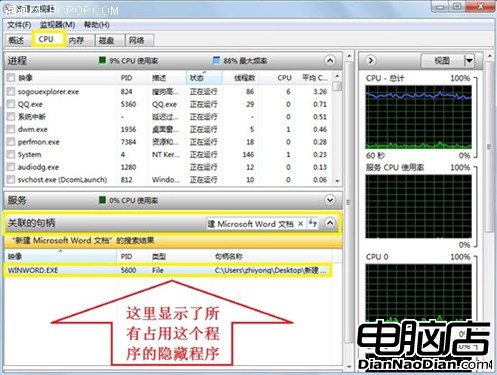
刪除檔案時提示「檔案已在其他程式中開啟」,重開機雖能解決但中斷工作。Windows 7 內建「資源監視器」能精準定位隱藏佔用進程,無需第三方工具。本文圖文教學:開啟資源監視器 → CPU 分頁 → 「相關聯的控制代碼」搜尋檔名 → 找到進程 (如 cmd.exe) → 右鍵結束程序 → 即可刪除。並提醒新手確認進程性質再結束,避免誤關重要程式造成資料遺失。
cmd.exe
Win 7 系統還原點完整指南:建立、還原、啟動修復、映像恢復 4 大模式
Windows 7 絕對不能停用的 10 項關鍵服務
Win7 使用 IE11 出現藍畫面?兩招快速修復教學
Win7 任務排程器設定自動關機圖文教學
Win7 開機選單殘留 PE 項目刪除:bcdedit 無效時改刪 boot.ini 解決 (PE 安裝法副作用)
Windows 7 程式庫功能完整教學:整合分散資料夾、設定預設儲存位置、告別檔案亂放
Win7 旗艦版找回右鍵「傳送到藍牙裝置」功能教學
Win10 圖片縮圖不顯示?取消「永遠顯示圖示」一鍵恢復