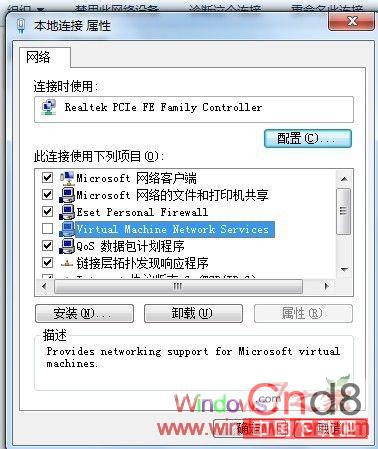
裝 Win7 後開機常提示網路未連線,區域連線打叉,等很久才好。更新網卡驅動無效。最終發現:移除「Microsoft 虛擬機網路服務」協議即可。
Win7 檔案刪不掉?三招解決「檔案正在被使用」頑固殘留
Win7 影音檔雙語並行(雙聲道語言重疊)完美解決方案
Win7 系統稽核技巧:記錄誰動過你的 QQ(適用任何程式)
Windows 7 優化五大迷思:XP 時代技巧為何會拖垮效能
Win7 開機提示 amdxata.sys 無法驗證?停用驅動程式簽名強制進入系統修復
解決 Win 7「輕鬆傳送」跨分區遷移存儲找不到檔案錯誤:三種修復方法
Windows 7 桌面便箋:打造專屬電子記事本,告別紙本便利貼
什麼是 Windows 7 Aero 效果?Shake、Snap、Peek 三大核心功能完整解析