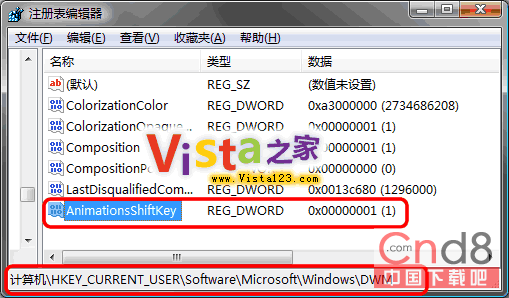
修改註冊表後,按住 Shift 鍵可讓視窗最小化/最大化/關閉動畫變慢播放,展現 Aero 玻璃特效細節:
regedit
HKEY_CURRENT_USER\Software\Microsoft\Windows\DWM
AnimationsShiftKey
1
前提:必須啟用 Aero 主題。修改後,Ctrl+Win+Tab (Flip 3D) 或按住 Shift 切換視窗時皆會呈現慢動作效果。
Win7 系統最低硬體需求與建議配備完整對照表
Win7 設定網路鄰居/共用資料夾存取權限 圖文教學
Windows 7 開機自動撥號寬帶連線設定教學
Win7 IE8 無回應/當機?四步驟重置修復流程(順序勿亂)
Windows 7 M3 更多介面截圖釋出:Ribbon UI 全面導入 Live Movie Maker、寫字板、畫圖、程式碼源自 Office 12
Ubuntu 10.10 關閉 USB 隨身碟自動掛載/自動開啟視窗設定
Windows 7 找不到攝像頭圖示?教你加入「電腦」快速存取
Windows 7 進入安全模式完整指南:三種啟動方式與常見故障排查