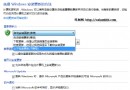
換了系統字體想換回預設微軟雅黑?極簡單:
路徑參考:
Control Panel\Appearance and Personalization\Fonts\Font settings控制台\外觀與個人化\字型\字型設定一鍵即可恢復系統原生字體渲染,無需重灌、無風險。
Windows 7 檔案總管預覽窗格完整解析:啟用、調整、支援格式與操作差異
Win7 提示「此 Windows 並非正版」黑畫面?官方延期指令與登錄表破解 360 天免費用法
Windows 7 快速查看無線網路密碼:三步驟在安全性分頁顯示明文金鑰,XP 做不到
Win 7 媒體中心 3 大核心功能:娛樂中樞、燒錄大師、電視擴展器
Windows 7 全新備份與還原體驗:系統映像備份、排程自動備份、系統修復光碟、Windows.old 非破壞重裝
怎麼辨別筆電預裝正版 Win7?三步驗證:COA 貼紙、底部標籤、系統啟用狀態