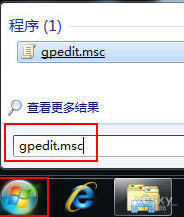
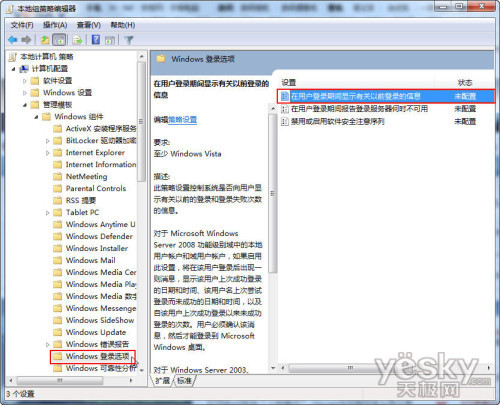
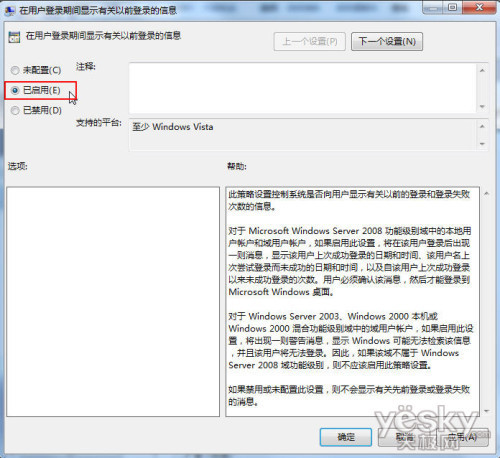
gpedit.msc
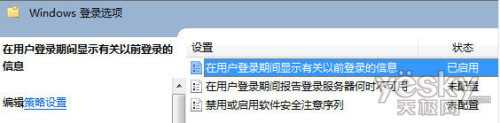
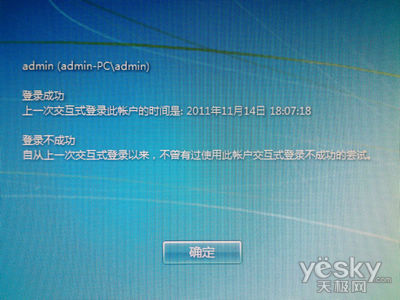
設定成功後,每次登入 Win7 系統都會顯示上一次的登入資訊(時間、狀態),方便發現電腦在離開期間是否被他人登入。
Win7 新增網路/舊型印表機完整圖文教學
Windows 7 Milestone 1 Build 6519 首測:介面似 Vista、記憶體 480MB、Gadgets 整合、XPS Viewer 內建
將 Win7 桌面路徑移至 D 槽,避免 C 槽爆滿與重灌遺失資料
顧問警告:Windows 7 熱銷可能掩蓋微軟轉型雲端的緊迫性
Windows 7 電源管理九大技術亮點:從 CPU 核心調度到 DVD 播放省電優化
Win7 系統還原、映像修復、啟動修復、命令提示字元完整攻略
Win 7 視窗顏色隨天氣變色?AeroWeather 小工具讓桌面活起來
Win10 開機黑屏過久?進安全模式關閉「快速啟動」與圖形驅動衝突排查