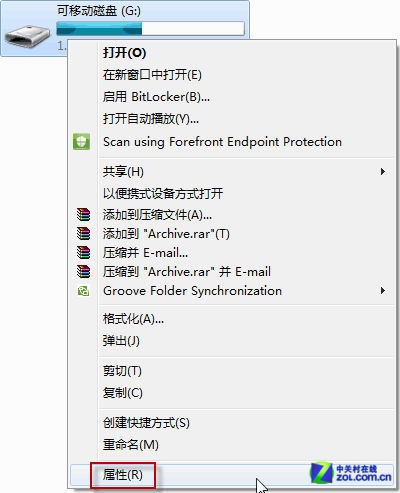
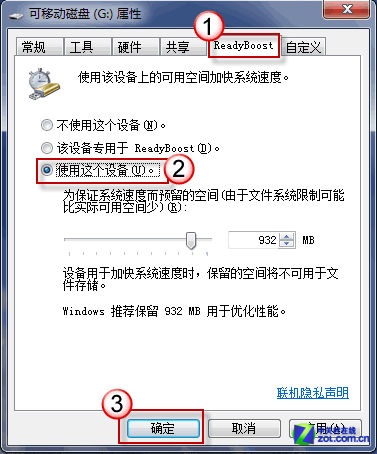
Windows 7 繼承 Vista 的 ReadyBoost 技術:將 USB 隨身碟/記憶卡作為快取擴充,對記憶體較小(<2GB)的舊電腦有明顯加速效果,操作簡單免費。
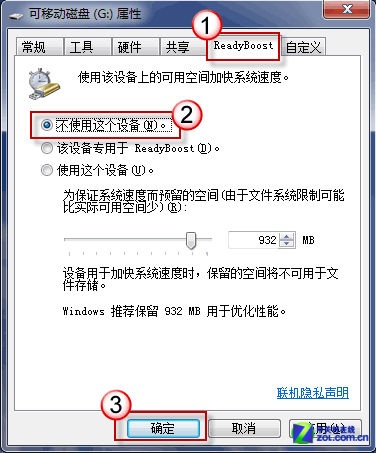
同頁籤取消勾選「使用這個裝置」即可。
提醒:ReadyBoost 非記憶體擴充,僅作為硬碟快取加速隨機讀寫;固態硬碟 (SSD) 系統無需啟用。隨身碟讀寫速度過慢可能反而拖累效能。
XP 升級 Windows 7 遇「產品金鑰僅能升級」錯誤?官方未回應,民間有解
Win7 旗艦版安裝軟體報錯 1327「無效磁碟機 G:」 (重複文章,內容同 78828)
Win7 雙系統移除其中一個作業系統的兩種方法
重灌 Windows 系統十大理由與五大方法:從光碟到金山衛士的演進
杭州頤高商場盜版 Win 7 猖獗 植入病毒竊取商業利益
Windows 7 開機出現 WINSYS.VBS 損壞錯誤?木馬病毒清除完整指南
Win7 輸入法圖示消失?控制台語言欄設定「停駐在工作列」找回
Win7 連接本地印表機完整步驟:驅動準備、服務確認、新增印表機精靈