Windows XP Windows 7 Windows 2003 Windows Vista Windows 綜合教學 Linux 系統教學
Windows 10 Windows 8 Windows 2008 Windows NT Windows Server 電腦軟體教學

Windows 7 設定自動關機指令教學

編輯:Windows 7 系統介紹

Windows 7 內建 shutdown 指令,無需第三方軟體即可設定定時自動關機,適合下載完成、睡前聽音樂等場景。

設定自動關機步驟

  1. 按 Win+R 開啟「執行」,輸入 cmd 開啟命令提示字元。
  2. 輸入指令:
    shutdown -f -s -t 秒數
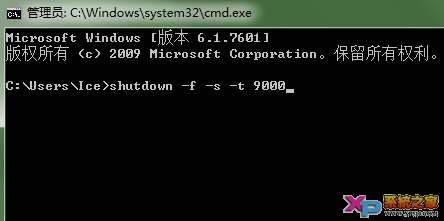
    例:shutdown -f -s -t 9000 代表 9000 秒(2.5 小時)後強制關機。
    參數說明:
    -s 關機;-f 強制關閉應用程式不提示;-t xxx 設定延遲秒數。
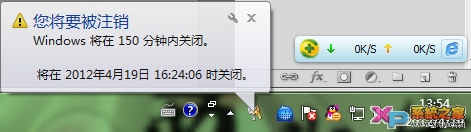
  3. 按 Enter,右下角將彈出倒數提示通知。

取消已排程的自動關機

在 CMD 中輸入 shutdown -a 按 Enter,系統提示「已取消排程關機」。
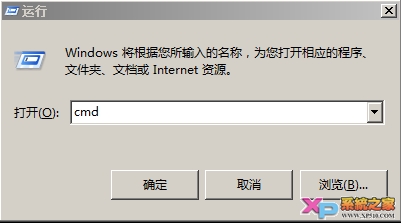
執行視窗輸入 cmd
輸入 shutdown 指令
自動關機倒數提示
輸入 shutdown -a 取消關機
關機排程已取消提示

善用此功能可節省電力、避免長時間無人看管,配合工作排程器更能實現每日定時關機自動化。

Copyright © Windows教程網 All Rights Reserved