Windows XP Windows 7 Windows 2003 Windows Vista Windows 綜合教學 Linux 系統教學
Windows 10 Windows 8 Windows 2008 Windows NT Windows Server 電腦軟體教學

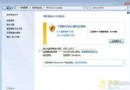
Win7 Windows Update 失敗錯誤 80071A91/80070643 終極修復:fsutil resource setautoreset

編輯:Windows 7 系統介紹

Windows 7 安裝 IE11 或更新時遭遇錯誤代碼 80071A91、80070643(Windows Update 遇到未知錯誤),主因是 NTFS 檔案系統資源管理器記錄損毀。單一指令 fsutil resource setautoreset true c: 即可修復,無需重灌或複雜操作。

錯誤現象

  • 安裝 Internet Explorer 11 提示「必須進行相關更新」
  • 執行 Windows Update 長時間卡住最終失敗
  • 錯誤代碼:80071A91、80070643

終極修復指令

  1. 開始 → 所有程式 → 附屬應用程式
  2. 右鍵「命令提示字元」→「以系統管理員身分執行」
  3. 輸入以下指令並按 Enter:
    fsutil resource setautoreset true c:
  4. 等待提示「操作成功完成」
  5. 重新執行 Windows Update,即可正常安裝更新與 IE11
注意:c: 為系統安裝槽代號。若系統安裝在 D 槽,請改為 d:。

原理說明

  • fsutil resource setautoreset:設定 NTFS 資源管理器在下次開機時自動重設交易記錄
  • 修復 $TxfLog、$TxfLog.blf 等交易記錄檔損毀導致的更新失敗
  • 屬檔案系統層級修復,不影響使用者資料與已安裝程式

驗證修復

  1. 重新開機(觸發自動重設)
  2. 開啟 Windows Update →「檢查更新」
  3. 嘗試安裝先前失敗的更新/IE11
  4. 確認無錯誤代碼 80071A91/80070643 出現

若仍失敗的進階排查

  • 執行 sfc /scannow 修復系統檔案
  • 執行 DISM /Online /Cleanup-Image /RestoreHealth(需 Win7 SP1 + DISM 回填)
  • 重設 Windows Update 元件:net stop wuauserv / bits / cryptsvc → 重命名 SoftwareDistribution → 重啟服務
  • 檢查磁碟錯誤:chkdsk c: /f /r
單一 fsutil 指令解決 90% 以上的 80071A91/80070643 錯誤,是 Win7 更新失敗的「神奇鑰匙」。

Copyright © Windows教程網 All Rights Reserved