開始選單搜尋框不見了?Windows Search 功能被關閉,重新啟用即可恢復
Windows 7 開始選單底部的搜尋框依賴「Windows Search」索引服務。若該 Windows 功能被關閉(或索引服務損毀),搜尋框會消失。透過「開啟或關閉 Windows 功能」勾選 Windows Search,等待索引重建即可恢復。
恢復步驟
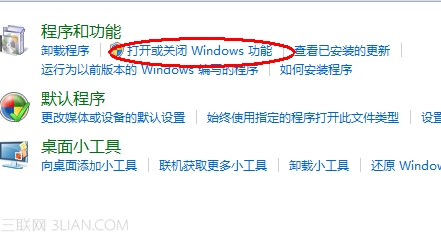
- 控制台 → 「程式集」 → 「開啟或關閉 Windows 功能」。
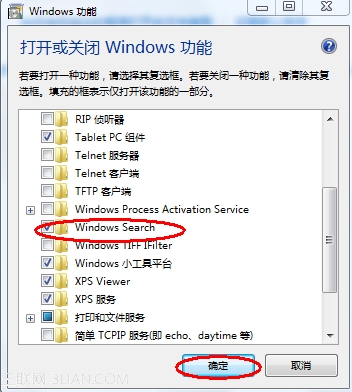
- 在清單中找到 Windows Search,打上勾選 → 確定。
- 系統提示「Windows 完成所需變更」,等待約 4~5 分鐘(索引重建)。
- 點擊開始按鈕,搜尋框已恢復於底部。

進階排查:搜尋框在但搜不到東西
- 控制台 → 「索引選項」→ 「進階」→ 「重建」索引。
- 確認「修改」→ 勾選欲索引的位置(使用者資料夾、資料庫、離線檔案等)。
- 服務管理員
services.msc 確認 Windows Search 服務為「自動/執行中」。
適用版本
Win7 家用入門版/家用基本版不包含 Windows Search 功能,無法透過此法恢復搜尋框(此版本開始選單原無搜尋框)。專業版/旗艦版/企業版完整支援。