Windows XP Windows 7 Windows 2003 Windows Vista Windows 綜合教學 Linux 系統教學
Windows 10 Windows 8 Windows 2008 Windows NT Windows Server 電腦軟體教學

Windows 7 找回搜尋框:啟用 Windows Search 功能

編輯:Windows 7 系統介紹

Windows 7 開始選單搜尋框消失?啟用 Windows Search 功能找回

若開始選單失去搜尋框,通常是 Windows Search 功能被停用。透過「開啟或關閉 Windows 功能」重新啟用即可恢復。

操作步驟

  1. 控制台 → 程式和功能。
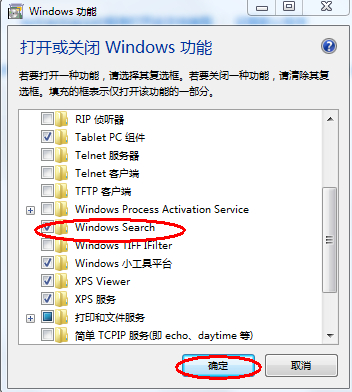
  2. 左側點選「開啟或關閉 Windows 功能」。
  3. 在清單中找到「Windows Search」,勾選核取方塊。
  4. 確定 → 系統安裝功能(約 4-5 分鐘) → 完成後搜尋框即出現在開始選單。
程式和功能開啟關閉Windows功能 Windows功能視窗 勾選Windows Search

補充:重建索引加快搜尋

啟用後若搜尋結果不全,至控制台 → 索引選項 → 進階 → 重建,等待完成即可。

Copyright © Windows教程網 All Rights Reserved