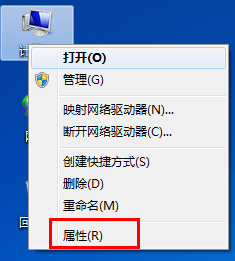
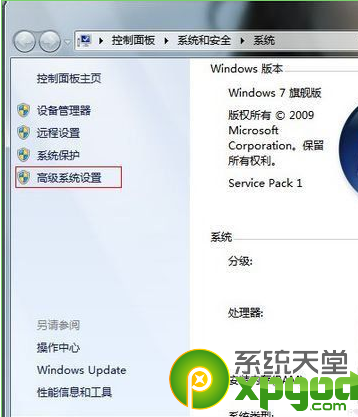
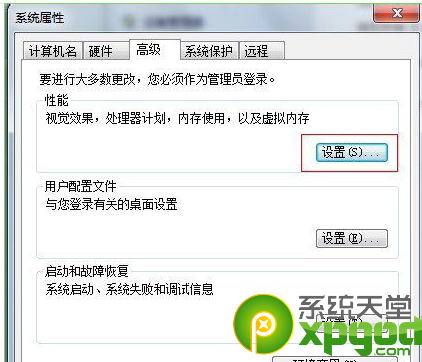
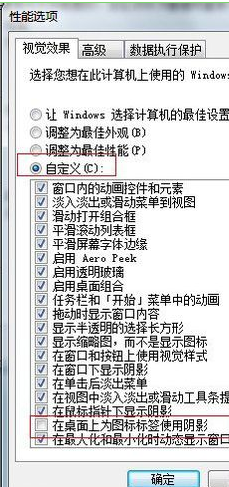
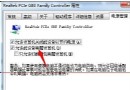
此選項同時控制圖示文字背景透明度與陰影,取消後文字變透明無底色,桌面更清爽。
Win7 共享有線網路讓手機上網:虛擬 WiFi 熱點兩條指令搞定
Win7 ADSL 自動斷線解決方案:關閉「閒置自動斷線」設定
Windows 7 啟用滑鼠懸停啟動視窗:輕鬆存取中心設定
BMW CIO 揭露升級 Windows 7 三大理由
寬帶線雙路由器串接/橋接兩種連線架構完整設定圖解
Win7 系統因 MMCSS 服務導致變慢?登錄表移除 Audiosrv 相依性解決
手動修改註冊表封鎖 ActiveX 安全漏洞(CVE-2009-0075 相關)
Windows 7 五大常見故障與解決方案:系統錯誤記錄、DVD 音訊、Movie Maker、XP Mode、媒體中心自動播放