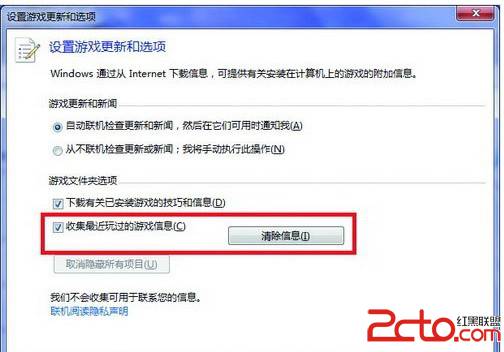
Win7 遊戲總管預設記錄使用者遊玩歷史。若不想保留記錄,可一鍵清除並停用蒐集功能。
之後不再記錄遊戲啟動時間、遊玩時長等資訊,並釋放相關快取空間。
Ghost Windows 7 安裝出現 "a destination volume could not be locked (641)" 解決方案
Windows 7 變慢怎麼辦?清理右鍵「開啟方式」殘留註冊鍵值提升效能
Windows 7 系統安裝五大注意事項:安裝方式、全新安裝、驅動備份、Windows.old、磁碟空間
Win7藍屏代碼大全與藍屏死機原因分析、處理方法完整指南
Win7 工作管理員被停用?群組原則啟用恢復 Ctrl+Alt+Del 功能
Windows 7 電源管理進階技巧:延長筆電續航、自訂方案、行動中心
Windows 7 Beta 1 深度體驗:效能、介面與核心架構全面進化
Win7 開機錯誤「登錄程序初始化失敗」 卸載 KB2839229 更新修復藍屏/無法進入桌面