Windows XP Windows 7 Windows 2003 Windows Vista Windows 綜合教學 Linux 系統教學
Windows 10 Windows 8 Windows 2008 Windows NT Windows Server 電腦軟體教學

Win7 開機提示找不到 iertutil.dll?兩種修復方法找回 DLL 檔

編輯:Windows 7 系統介紹

Windows 7 開機或啟動程式時彈出「找不到 iertutil.dll」,通常因系統檔案遺失、損毀或註冊表錯誤。提供兩種修復方案:系統檔案複製法與外部複製註冊法。

方法一:從系統快取區複製修復 (需進入系統)

  1. 右鍵工作列 → 「工作管理員」 → 「檔案」 → 「新增工作」 → 「瀏覽」。
  2. 輸入路徑 C:\Windows\System32\dllcache 確定。
  3. 找到 iertutil.dll 雙擊開啟 (或複製)。
  4. 於命令提示字元 (以管理員身分) 輸入:
    copy C:\Windows\System32\dllcache\iertutil.dll C:\Windows\System32\
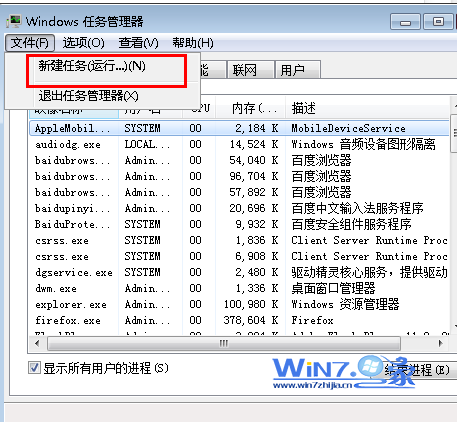
  5. 提示「已複製 1 個檔案」後重新開機。

工作管理員新增工作瀏覽 dllcache

方法二:從他電腦/U碟複製並註冊 (適用無法進入系統)

  1. 從相同版本 Win7 電腦複製 C:\Windows\System32\iertutil.dll 至 USB 隨身碟。
  2. 問題電腦開機進入安全模式或使用安裝光碟修復模式開啟命令提示字元。
  3. 將檔案從 USB 複製至 C:\Windows\System32\。
  4. 於命令提示字元輸入註冊指令:
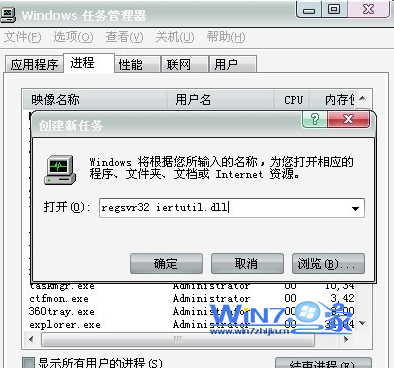
    regsvr32 iertutil.dll
  5. 提示「DllRegisterServer 成功」後重新開機。

regsvr32 註冊 DLL 成功畫面

注意事項

  • iertutil.dll 為 Internet Explorer 核心元件,版本必須與系統完全一致 (x86/x64、版本號)。
  • 若系統檔案大量損毀,建議執行 sfc /scannow 全盤掃描修復或重裝系統。
  • 操作前請備份重要資料。
Copyright © Windows教程網 All Rights Reserved