Windows XP Windows 7 Windows 2003 Windows Vista Windows 綜合教學 Linux 系統教學
Windows 10 Windows 8 Windows 2008 Windows NT Windows Server 電腦軟體教學

Win7 禁止 IE 瀏覽器彈出檔案下載提示視窗(群組原則法)

編輯:Windows 7 系統介紹

瀏覽網頁時頻繁跳出「檔案下載 - 安全性警告」視窗,稍有不慎點擊即可能安裝惡意軟體。透過本機群組原則可徹底禁用 IE 的檔案下載功能,提升安全性。

設定步驟

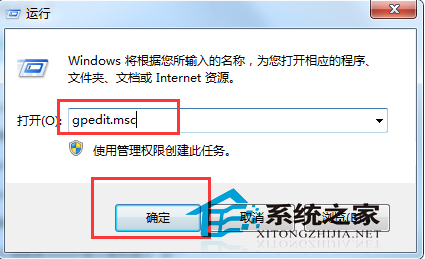
  1. 按 Win+R → 輸入 gpedit.msc → 開啟「本機群組原則編輯器」。
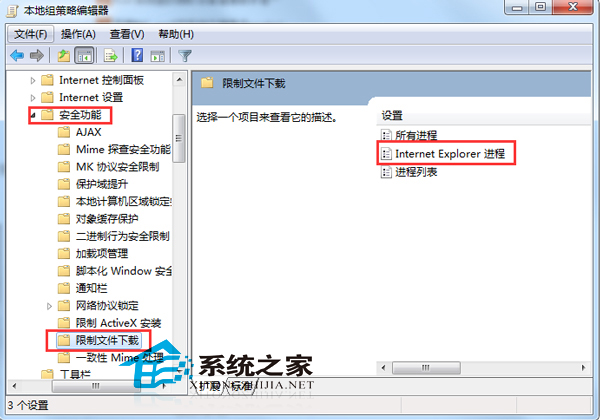
  2. 依序展開:
    電腦設定 → 系統管理範本 → Windows 元件 → Internet Explorer → 安全性功能 → 限制檔案下載
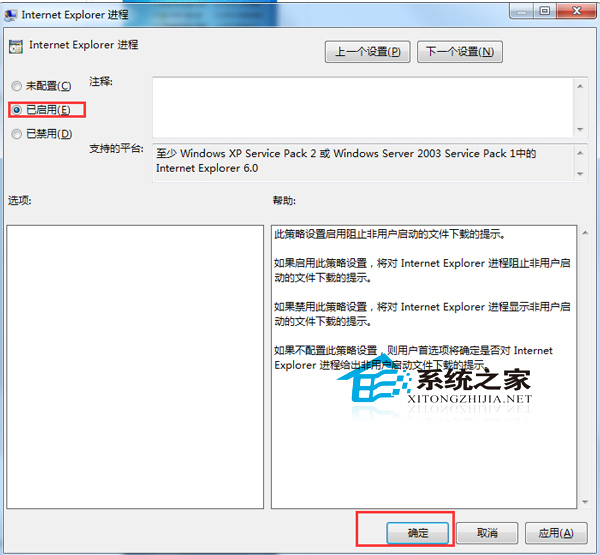
  3. 雙擊右側「限制檔案下載」,選擇 「已啟用」,點擊「確定」。
  4. 執行 Win+R → gpupdate /force 強制重新套用原則,或重新開機。

開啟群組原則編輯器

限制檔案下載路徑

設定已啟用

注意事項

  • 此設定僅對 Internet Explorer 生效,Edge、Chrome、Firefox 等瀏覽器不受影響。
  • 啟用後,IE 將無法下載任何檔案(含正常附件),若需暫時下載,請暫時改回「未設定」或「已停用」。
  • Win7 家用版/家用進階版無 gpedit.msc,可透過登錄表修改:
    HKEY_CURRENT_USER\Software\Microsoft\Windows\CurrentVersion\Internet Settings\Zones\3 → 1803 (下載檔案) 值設為 00000003 (停用)。

Copyright © Windows教程網 All Rights Reserved