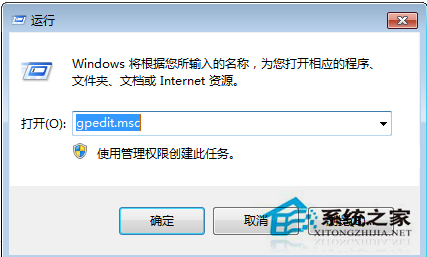
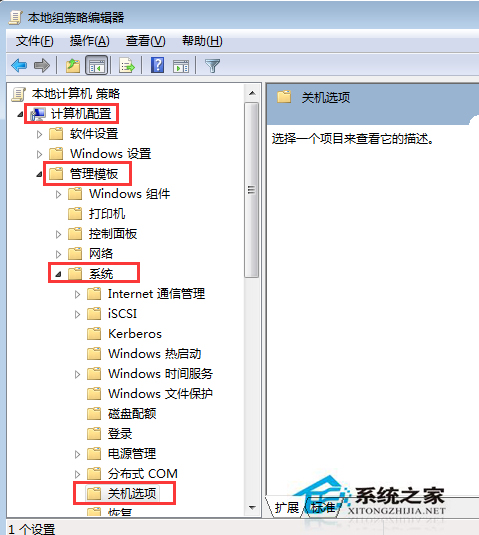
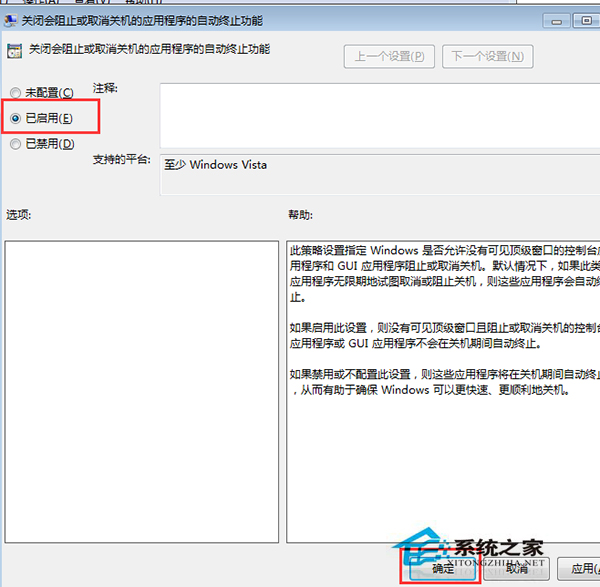
關機時系統等待程式結束導致久久無法關機,透過群組原則啟用「自動終止阻礙關機的應用程式」即可無提示關機且不損壞程式。
gpedit.msc
Win7 區域網路共享印表機設定:啟用 Guest、共享印表機、連線測試
Win7 禁止桌面建立資料夾:NTFS 權限設定「拒絕寫入」養成好習慣
Win7 修改時間提示「無法繼續 沒有權限」?工作列新增「位址」工具列快速開啟控制台
Windows 7 64 位元版 QQ 輸入法聯想欄背景變黑?一鍵換膚解決
Win7 Word 文件設定開啟/修改密碼保護機密內容
Win7 移除不常用功能/驅動精簡系統:「Windows7 瘦身秘書」綠色工具一鍵刪除 20 類元件加速啟動減少佔用
Windows 7 耳機/喇叭沒聲音?內建音訊診斷精靈一鍵排查(繁體版)
Win7 Administrator 帳戶無法修改密碼?取消「使用者無法變更密碼」限制