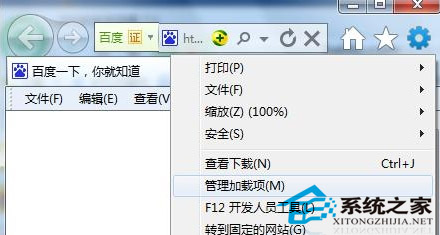
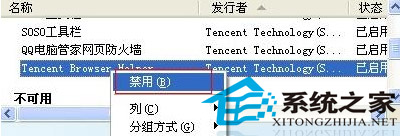
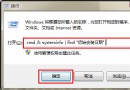
IE8 網址列或搜尋框輸入時彈出自動提示,干擾操作,常由第三方附加元件(如騰訊瀏覽器助手)導致。
同理可停用其他干擾的工具列/延伸模組。若需完整移除,請在「控制台」→「程式與功能」解除安裝對應軟體。
Win7 主題聲音方案提取與跨主題套用:把「愛爾蘭」凱爾特音樂用在任何主題
Win7 拖曳視窗內容消失只剩邊框?關閉 Aero 特效恢復拖曳顯示
東芝筆電 Win7 進入 BIOS 設定介面兩種方法
Win7 如何掛載與卸載 VHD 虛擬硬碟?磁碟管理圖形介面操作全攻略
Win 7 開始選單深度客製化:隱藏最近項目、加入「執行」指令、調整電源鈕行為
Windows 7 安裝後資料夾無法存取?一鍵註冊表修復「管理員取得所有權」右鍵選單
區域網路 Win7 存取 XP 最簡便方法:複製「網上鄰居」捷徑
Windows 7 升級漏洞:用戶免費領取價值 2460 元旗艦版